 View
ViewWhy Every CompTIA A+ Candidate Needs a Real Toolkit
The CompTIA A+ certification is the most widely recognized entry-level IT credential in the world, and the 220-1201 (Core 1) exam puts 38% of its weight on hardware (25%) and mobile devices (13%) — topics where hands-on experience makes the difference between guessing and knowing.
While the exam itself is taken on a computer, the performance-based questions (PBQs) simulate real-world repair scenarios where you must select the correct tools, follow proper ESD procedures, and troubleshoot hardware. Candidates who have actually opened a laptop, replaced RAM, or swapped a hard drive consistently outperform those who only studied from textbooks.
This guide covers the five best electronics repair toolkits for A+ candidates in 2026, mapped directly to exam objectives. Whether you are studying for your first IT certification or building your professional toolkit, the right tools will accelerate both your exam preparation and your career.
Already studying for the A+ exam? Access our complete CompTIA A+ exam prep guide — free practice questions, topic breakdowns, and AI-powered study tools for every 220-1201 and 220-1202 objective.
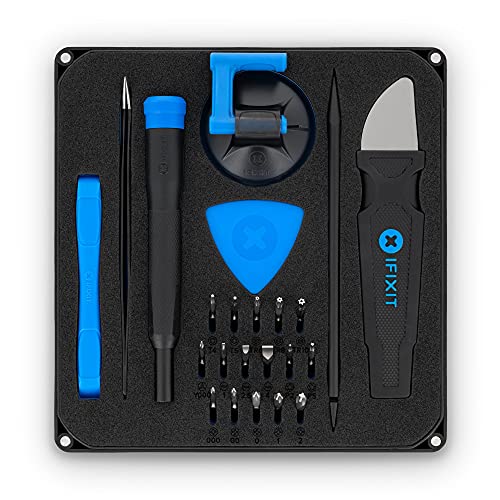
iFixit Essential Electronics Toolkit - PC Laptop Phone Repair Kit
by iFixit
$24.99
- Includes 64-bit precision screwdriver, spudgers, opening picks, suction cup, and anti-static wristband — the core hand tools for CompTIA A+ disassembly practice
- Magnetic driver handle with swivel top for one-handed operation during laptop and mobile device disassembly
- Best entry-level professional toolkit for A+ candidates at $24.99 — covers PC, laptop, tablet, and phone repair
CompTIA A+ Tool Requirements: What the Exam Actually Tests
Screwdriver Types (Core 1 hardware and mobile-device work)
Screwdrivers are on CompTIA's sample lab list for A+ Core 1; know which type fits which hardware task:
- Phillips (#0, #1, #2) — The most common screwdriver type in PC repair. #2 Phillips is used for desktop case screws, drive mounting screws, and power supply screws. #1 and #0 Phillips are used for laptop screws, which are significantly smaller.
- Torx (T5 through T30) — Used in laptops (especially older ThinkPads and Dell Latitudes), some desktop hard drive screws, and many mobile devices. T5 and T6 are common in smartphones and tablets. T8 and T10 appear in laptop and gaming console teardowns.
- Flathead / Slotted — Less common in modern electronics but still useful. Used for adjustment screws, some terminal screws, and as a prying tool in emergency situations (though spudgers are preferred to avoid damage).
- Hex (Allen) — Occasionally used in rack-mounted server equipment, some printer assemblies, and specialty mounting hardware.
Pry Tools and Spudgers (220-1201 Objective 1.1)
Modern laptops and mobile devices use plastic snap-fit housings that cannot be opened with screwdrivers alone. The A+ exam tests knowledge of:
- Spudgers (nylon/plastic) — Used to pry open laptop bezels, disconnect ribbon cables, and separate snap-fit plastic housings without scratching or cracking. This is a critical tool for laptop and mobile device repair.
- Opening picks / Guitar picks — Thin plastic wedges inserted into seams to release clips around laptop and tablet housings. Essential for devices with no visible screws.
- Suction cups — Used to lift screens on devices with adhesive-mounted displays (iPads, iPhones, some laptop displays).
- Metal spudgers — Used for tougher separations, but require more care to avoid scratching surfaces or shorting components.
ESD Prevention Tools (220-1202 Objective 4.4)
Core 2 objective 4.4 lists ESD straps, ESD mats, and antistatic bags among its safety procedures:
- Anti-static wristband — The primary ESD prevention tool. Must be worn on bare skin and clipped to an unpainted metal surface on the computer chassis. The exam will test proper usage and common mistakes (like clipping to a painted surface).
- Anti-static mat / ESD mat — Provides a grounded work surface. Components should be placed on the mat during disassembly, not on carpet, cardboard, or synthetic surfaces.
- Anti-static bags — Used for storing and transporting sensitive components. The exam tests that components should be placed inside (not on top of) anti-static bags.
Additional Specialty Tools
- Tweezers (ESD-safe) — For handling jumper caps, small connectors, and SMD components. Must be ESD-safe (non-conductive tips or properly grounded).
- Multimeter — For testing power supply voltages, continuity, and resistance. CompTIA's Core 1 summary lists multimeters among troubleshooting tools.
- Thermal paste / Compound — Required when installing or reinstalling a CPU heatsink. Core 1 objective 3.5 lists thermal paste/pads under cooling.

iFixit Pro Tech Toolkit - Electronics Smartphone Computer Tablet Repair Kit
by iFixit
$74.99
- Industry gold standard with 64 precision bits, flexible extension, ESD-safe tweezers, and magnetizer/demagnetizer — used by professional repair technicians worldwide
- Complete opening tool set including metal and nylon spudgers, Jimmy pry tool, and suction handle for non-destructive device entry
- Best overall toolkit for IT professionals — covers every CompTIA A+ hardware objective and serves as a career-long investment
The 5 Best Electronics Toolkits for CompTIA A+ in 2026
1. iFixit Essential Electronics Toolkit — Best Entry-Level Kit ($24.99)
The iFixit Essential Electronics Toolkit is the best starting point for CompTIA A+ candidates. At $24.99, it covers the core hand-tool categories for A+ lab practice at a price that will not strain a student budget.
What is included:
- 64-bit precision screwdriver with magnetic driver handle and swivel top
- Phillips, Torx, hex, pentalobe, tri-point, and specialty bits
- Nylon spudger and plastic opening picks
- Suction cup for screen removal
- Anti-static wristband
- SIM card eject tool
- Organized carrying case
Why it maps to CompTIA A+ objectives:
The Essential Toolkit covers the three core hand-tool categories for A+ lab practice: screwdrivers (multiple types and sizes), pry tools (spudger and opening picks for non-destructive disassembly), and ESD prevention (anti-static wristband). The 64-bit set includes Phillips, Torx, hex, and specialty bits.
The magnetic driver handle is particularly useful for laptop repair practice, where screws are tiny and easily lost. The swivel top allows one-handed operation, which becomes essential when you are holding a laptop panel open with the other hand.
Best for: Budget-conscious students, first-time A+ candidates, and anyone who wants a compact professional kit for lab practice.
Limitations:
- No tweezers (the Pro Tech includes ESD-safe tweezers)
- No flexible extension for reaching recessed screws
- No magnetic mat for screw organization (available in the bundle)
iFixit Essential Electronics Toolkit - PC Laptop Phone Repair Kit
by iFixit
$24.99
- Includes 64-bit precision screwdriver, spudgers, opening picks, suction cup, and anti-static wristband — the core hand tools for CompTIA A+ disassembly practice
- Magnetic driver handle with swivel top for one-handed operation during laptop and mobile device disassembly
- Best entry-level professional toolkit for A+ candidates at $24.99 — covers PC, laptop, tablet, and phone repair
2. iFixit Pro Tech Toolkit — Best Overall Kit ($74.99)
The iFixit Pro Tech Toolkit is the gold standard in electronics repair and the toolkit that professional IT technicians, repair shops, and repair educators recommend worldwide. If you are serious about an IT career beyond just passing the A+ exam, this is the investment that pays for itself.
What is included (beyond the Essential):
- Everything in the Essential Toolkit, plus:
- ESD-safe precision tweezers (angled and blunt-tip)
- Flexible extension for reaching recessed screws
- Magnetizer/demagnetizer for screwdriver tips
- Metal spudger for tougher separations
- Jimmy pry tool for metal device housings
- Nylon-tipped probes
- Halberd spudger for cable disconnection
- iFixit opening tool (blue plastic wedge)
- Expanded opening pick set
Why it is worth the premium for career-focused candidates:
The Pro Tech Toolkit adds tools that the Essential kit lacks but that professional technicians use daily. ESD-safe tweezers are essential for handling jumper caps, extracting tiny screws from recessed holes, and manipulating ribbon cable connectors — tasks that come up constantly in laptop and printer repair. The flexible extension reaches screws hidden behind motherboard components or deep inside laptop chassis. The magnetizer/demagnetizer lets you magnetize your screwdriver to grip screws (critical for laptop work) and demagnetize it when working near sensitive storage media.
Best for: Career IT technicians, candidates pursuing multiple CompTIA certifications, and anyone who wants a single toolkit that lasts an entire career.
iFixit Pro Tech Toolkit - Electronics Smartphone Computer Tablet Repair Kit
by iFixit
$74.99
- Industry gold standard with 64 precision bits, flexible extension, ESD-safe tweezers, and magnetizer/demagnetizer — used by professional repair technicians worldwide
- Complete opening tool set including metal and nylon spudgers, Jimmy pry tool, and suction handle for non-destructive device entry
- Best overall toolkit for IT professionals — covers every CompTIA A+ hardware objective and serves as a career-long investment
3. iFixit Essential + Magnetic Project Mat Bundle — Best Value Bundle ($44.99)
The iFixit Essential + Magnetic Mat Bundle combines the Essential Toolkit with a magnetic project mat — solving the biggest challenge in laptop and mobile device disassembly: screw organization.
Why the magnetic mat matters:
A typical laptop teardown involves 15 to 30+ screws of varying lengths and thread sizes. Using the wrong screw in the wrong hole can strip threads, crack plastic standoffs, or even puncture a battery. Professional technicians use magnetic mats to:
- Organize screws by location — Place screws on the mat in the same spatial arrangement as the device, creating a visual map.
- Prevent rolling and loss — The magnetic surface holds ferrous screws in place, even if the mat is bumped.
- Diagram screw placement — Many magnetic mats have a dry-erase surface for labeling screw groups.
- Provide an ESD-safe work surface — Reduces static buildup compared to bare desk surfaces.
CompTIA A+ Core 2 objective 4.4 lists proper component handling and storage among safety procedures. Using a magnetic mat is a professional way to organize parts during disassembly.
Best for: Candidates who plan to practice multiple full laptop teardowns, and anyone who has lost a tiny screw inside a carpet.
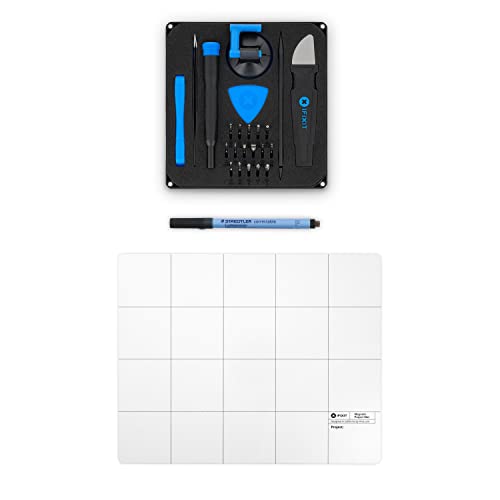
iFixit Essential Electronics Toolkit + Magnetic Project Mat Bundle
by iFixit
$44.99
- Combines the Essential Toolkit with a magnetic project mat for organized screw management during disassembly — a CompTIA A+ best practice
- Magnetic mat prevents small screws from rolling away and allows diagramming of screw placement by section during laptop teardowns
- Best value bundle for A+ candidates who want professional organization from day one — saves vs buying separately
4. Rosewill RTK-146 — Best Comprehensive PC Toolkit ($59.99)
The Rosewill RTK-146 takes a different approach than the iFixit kits: instead of focusing exclusively on precision electronics repair, it provides a comprehensive 146-piece PC and networking toolkit that covers a much wider range of IT tasks.
What is included (beyond standard screwdriver sets):
- Full Phillips, flathead, Torx, hex, and nut driver sets
- Soldering iron with solder and desoldering pump
- Cable tester for RJ-45 and RJ-11
- IC (integrated circuit) extractor
- Wire crimpers and wire strippers
- Parts retriever (telescoping magnetic pickup tool)
- ESD wristband and parts tube
- Organized hard-shell carrying case
Why it stands out for A+ and Network+ candidates:
The RTK-146 is the only toolkit on this list that includes a cable tester, soldering iron, and wire crimpers. If you are planning to pursue both CompTIA A+ and CompTIA Network+ (a common certification path), this single toolkit covers hardware repair, cable termination, and basic soldering — three skill areas that span both exams.
The cable tester alone is worth significant value for Network+ preparation, where you need to understand cable testing, wire mapping, and continuity verification. The soldering iron, while not directly tested on the A+ exam, is a practical skill for component-level repair and is increasingly relevant as right-to-repair legislation expands.
Limitations:
- Screwdriver bits are not as precise as iFixit for tiny laptop and mobile device screws
- No spudgers or plastic pry tools (you would need to add these separately for laptop work)
- Carrying case is larger and heavier — less portable than iFixit kits
Best for: Candidates pursuing A+ and Network+ together, aspiring field technicians who need a complete toolbox, and anyone who wants maximum tool variety in one kit.

Rosewill Tool Kit RTK-146 Computer Tool Kits for Network & PC Repair with ESD Strap
by Rosewill
$59.99
- 146-piece comprehensive PC toolkit with soldering iron, cable tester, IC extractor, wire crimpers, and full screwdriver set — ideal for A+ and Network+ combined prep
- Includes ESD wristband, parts tube, and organized carrying case for professional field service work
- Best comprehensive kit for candidates pursuing multiple CompTIA certifications or broad IT career paths
5. Precision 130-in-1 Screwdriver Kit with Anti-Static Mat — Best Budget Option ($19.99)
For candidates on the tightest budget, this 130-in-1 precision screwdriver kit provides impressive bit coverage and includes an anti-static mat — all for under $20.
What is included:
- 130 precision screwdriver bits (Phillips, Torx, hex, pentalobe, tri-point, Y-type, and more)
- Magnetic driver handle with flexible shaft extension
- Anti-static work mat
- Magnetizer ring
- Plastic pry tools and SIM eject pin
- Organized carrying case
Why it works for A+ exam prep:
This kit covers the two most important tool categories for A+ preparation: screwdriver types and ESD prevention. The 130-bit selection covers a broad range of screwdriver types, and the anti-static mat provides a grounded work surface for safe component handling. The flexible shaft extension is a bonus that even the iFixit Essential does not include at this price point.
Limitations:
- Build quality is lower than iFixit — bits may wear faster with heavy use
- No anti-static wristband included (purchase separately for $3-5)
- Spudger and pry tool selection is minimal compared to iFixit kits
- No brand reputation or lifetime warranty like iFixit
Best for: Students on a strict budget who need to practice disassembly and want broad bit coverage, or as a supplemental kit alongside an iFixit toolkit.
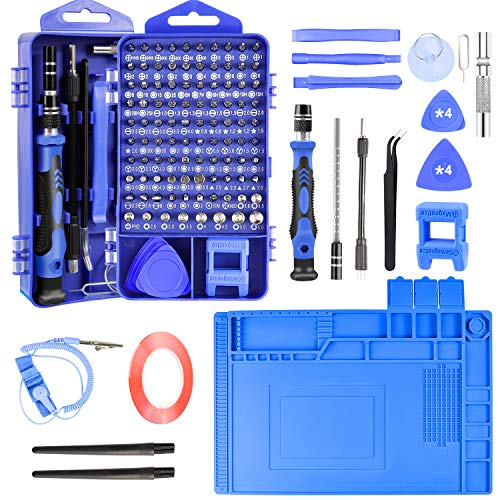
Precision Screwdriver Kit 130-in-1 Electronics Repair Tool Set with Anti-Static Mat
by Generic
$19.99
- Budget-friendly 130-piece set with Phillips, Torx, hex, and specialty bits plus an anti-static mat — covers basic A+ tool requirements at the lowest price
- Magnetic screwdriver handle with flexible shaft extension for reaching recessed screws in tight enclosures
- Best option for students on a tight budget who need broad bit coverage for practice disassembly
ESD Prevention: A Core 2 Safety Objective
Electrostatic discharge prevention is part of Core 2 (220-1202) objective 4.4, which lists ESD straps, ESD mats, equipment grounding, and antistatic bags, and it matters in every Core 1 hardware task. The A+ exams use multiple-choice, drag-and-drop, and performance-based questions.
How ESD Damages Components
Static electricity builds up naturally through friction between materials — walking on carpet, sliding on a chair, even moving your arm across a desk surface. This charge accumulates on your body and discharges instantly when you touch a grounded conductor like a computer component.
Useful reference numbers:
| Threshold | Significance |
|---|---|
| 30 volts | Minimum voltage that can damage sensitive components (MOSFETs, CMOS chips) |
| 100 volts | Can damage RAM modules, SSDs, and CPU pins |
| 3,500 volts | Minimum voltage a human can feel — meaning you can destroy components 100 times over without any sensation |
| 20,000+ volts | Common static discharge from walking on carpet in dry conditions |
A Safe ESD Prevention Procedure
Follow this procedure in order:
- Power off the computer and unplug it from the wall outlet (do not just shut down — physically disconnect the power cord).
- Press the power button for 5 seconds after unplugging to discharge residual capacitor charge.
- Attach anti-static wristband to bare skin on your wrist (not over clothing).
- Clip the alligator lead to an unpainted metal surface on the computer chassis (not a painted panel, not the desk, not a screw — unpainted chassis metal).
- Place the ESD mat on the work surface if available, and connect its ground wire to the same chassis ground.
- Handle components by edges only — never touch gold contacts, IC chips, or pin arrays.
- Store removed components in anti-static bags — inside the bag, not resting on top of it (a common exam trap question).
Humidity and Environmental Factors
Core 2 objective 4.5 covers temperature and humidity-level awareness:
- Humidity above 50% reduces static buildup significantly — this is why data centers maintain controlled humidity.
- Dry environments (below 30% humidity) dramatically increase ESD risk — winter months with indoor heating are the highest risk.
- Carpet, wool, and synthetic fabrics generate more static than hardwood, tile, or anti-static flooring.
- Self-grounding (touching the chassis before handling components) works as a backup but is not a substitute for a wristband.
Tool Organization and Professional Best Practices
Hardware and Network Troubleshooting (domain 5.0) is 28% of A+ Core 1, and proper tool organization is a core part of professional repair procedure.
Documenting Disassembly
When you disassemble a laptop or desktop PC, follow this process:
- Document the starting state — Note or photograph cable connections, component positions, and screw locations before removing anything.
- Label and organize screws — Group screws by removal step. A magnetic mat is the professional way to do this. Without a mat, use labeled cups, bags, or tape strips.
- Note cable orientations — Ribbon cables, SATA cables, and power connectors often have a specific orientation. Photograph or label before disconnecting.
- Reassemble in reverse order — Follow your documentation in reverse to ensure every screw, cable, and component returns to its correct position.
Why Magnetic Mats Are Worth the Investment
A magnetic project mat transforms disassembly from a nerve-wracking screw-chasing exercise into an organized, repeatable process. For CompTIA A+ lab practice, a magnetic mat lets you:
- Practice full laptop teardowns without fear of losing screws
- Learn the different screw types and sizes by seeing them organized spatially
- Build muscle memory for the disassembly/reassembly process tested on PBQs
- Develop professional habits that carry directly into your first IT job
The iFixit Essential + Magnetic Mat Bundle ($44.99) combines the Essential Toolkit with a magnetic mat at a lower price than buying both separately. For students who plan to practice multiple teardowns, this bundle offers the best value.
Matching Toolkits to Your Career Path
Path 1: A+ Only → Help Desk / Desktop Support
If your immediate goal is passing the CompTIA A+ exam and landing a help desk or desktop support role, the iFixit Essential Electronics Toolkit ($24.99) is the most efficient choice. It covers the core hand tools, fits in a backpack, and provides enough capability for the hardware tasks you will encounter in entry-level IT support.
Path 2: A+ → Network+ → Security+ (CompTIA Trifecta)
If you are pursuing the CompTIA trifecta (A+, Network+, Security+), consider the Rosewill RTK-146 ($59.99) for its cable tester and crimping tools. Network+ requires hands-on knowledge of cable termination, and having the tools to practice RJ-45 termination at home accelerates your preparation significantly.
Path 3: Career IT Technician / Field Service
If you are building a career in IT hardware repair, field service, or managed services, invest in the iFixit Pro Tech Toolkit ($74.99) from the start. It is the toolkit you will use for years, and its precision tools handle everything from smartphone screen replacement to server maintenance. Pair it with the magnetic mat bundle for a complete professional workstation.
Path 4: Maximum Budget Constraint
If budget is the primary constraint, the 130-in-1 Precision Kit ($19.99) gets you practicing for under $20. Add a separate anti-static wristband ($3-5 on Amazon) and you have the essential tools for A+ lab practice at approximately $25 total.
How to Practice Hardware Skills for CompTIA A+ PBQs
Performance-based questions on the CompTIA A+ exam simulate real-world IT scenarios. While you interact with a virtual environment on the test, the knowledge behind PBQs comes from hands-on experience. Here is how to build that experience with your toolkit:
Practice Exercise 1: Full Desktop Teardown and Reassembly
- Obtain an old or used desktop PC (thrift stores, e-waste recyclers, or your own old computer).
- Follow proper ESD procedure — wristband on, clipped to chassis.
- Document the starting state with photographs.
- Remove the side panel and identify every component: motherboard, CPU with heatsink, RAM, storage drives, GPU, PSU, case fans, front panel connectors.
- Disconnect and remove each component, organizing screws on your magnetic mat.
- Reassemble completely and verify the system boots.
- Repeat until you can complete the process in under 30 minutes.
Practice Exercise 2: Laptop Disassembly (Keyboard and RAM Access)
- Obtain an old laptop (any brand — HP, Dell, Lenovo are easiest for beginners).
- Look up the service manual online (search "[model] service manual PDF").
- Remove the bottom panel screws, noting different screw lengths on your magnetic mat.
- Access and remove the RAM modules, noting the release tab mechanism.
- Access and remove the storage drive (SATA HDD/SSD or M.2 NVMe).
- If applicable, remove the keyboard assembly to access the motherboard.
- Reassemble and verify all keys, trackpad, and ports function.
Practice Exercise 3: Printer Maintenance
- If you have access to an old inkjet or laser printer, practice removing and replacing ink cartridges or toner.
- Open the printer to identify the feed roller, fuser assembly (laser), and print head (inkjet).
- Practice the printer maintenance tasks in A+ Core 1 Objective 3.8: replacing toner or ink cartridges, applying a laser maintenance kit, calibrating, cleaning, and clearing paper jams.
- Note: Laser printers contain high-voltage components — always unplug and wait before opening.
Quick Comparison: Which Toolkit Should You Buy?
| Feature | iFixit Essential ($24.99) | iFixit Pro Tech ($74.99) | iFixit + Mat Bundle ($44.99) | Rosewill RTK-146 ($59.99) | 130-in-1 Budget ($19.99) |
|---|---|---|---|---|---|
| Precision screwdriver bits | 64 | 64 | 64 | Full set (standard sizes) | 130 |
| Spudgers / Pry tools | Yes | Yes (expanded) | Yes | No | Minimal |
| Anti-static wristband | Yes | Yes | Yes | Yes | No (mat only) |
| Magnetic mat | No | No | Yes | No | Yes (anti-static mat) |
| ESD-safe tweezers | No | Yes | No | No | No |
| Flexible extension | No | Yes | No | No | Yes |
| Cable tester | No | No | No | Yes | No |
| Soldering iron | No | No | No | Yes | No |
| Best for | A+ exam prep | Career IT tech | Organized practice | A+ and Network+ | Tight budget |
Start Studying for CompTIA A+ Today
A toolkit gives you the hands-on skills, but passing the A+ exam requires mastering the theoretical knowledge across all exam objectives. OpenExamPrep provides everything you need to prepare — completely free:
- Free CompTIA A+ Exam Guide — Complete topic breakdowns for 220-1201 (Core 1) and 220-1202 (Core 2), organized by exam objective
- Practice Questions — Test your knowledge with exam-style questions covering hardware, networking, mobile devices, software troubleshooting, and operational procedures
- AI Tutor — 10 free questions per day — ask about ESD procedures, screwdriver types, laptop disassembly, printer maintenance, or any A+ topic
- Performance-Based Question Practice — Simulate real-world troubleshooting scenarios to build confidence for PBQs
Combine hands-on toolkit practice with our free study materials, and you will walk into the testing center with both the knowledge and the experience to pass the CompTIA A+ exam on your first attempt.
As an Amazon Associate, OpenExamPrep earns from qualifying purchases. All recommendations are based on editorial review.

 Free CE
 Learning path on Pluralsight
 Take courses on Udemy