 View
ViewWhy Your E6B Choice Matters for the Instrument Rating
The FAA Instrument Rating is one of the most demanding pilot certifications you can earn. It authorizes you to fly under Instrument Flight Rules (IFR) — navigating through clouds, low visibility, and complex airspace using only your instruments. To get there, you must pass two tests: the Instrument Rating Airplane (IRA) knowledge test (a 60-question, 2-hour computer exam) and the practical test (checkride), which includes an oral exam and a flight evaluation.
Both tests require you to demonstrate mastery of IFR flight planning, and that means working with an E6B flight computer. The E6B is not just a testing tool — it is a fundamental part of instrument flying. You will use it to calculate wind correction angles, determine groundspeed, compute fuel burn, figure density altitude, and solve time-speed-distance problems. On the checkride, your DPE (Designated Pilot Examiner) will expect you to plan a full IFR cross-country flight using these tools.
Here is what most instrument students do not realize until it is too late: the knowledge test and the checkride have completely different E6B requirements. For the knowledge test, speed is everything — an electronic E6B gets you through wind problems in seconds. For the checkride, most DPEs want to see you work the manual "whiz wheel" to prove you understand the fundamentals. You need both.
This guide covers every E6B flight computer and IFR-specific tool you need for the Instrument Rating in 2026, including the impact of PSI's September 2024 testing center update.
What You Need for the Instrument Rating: Knowledge Test vs Checkride
Understanding the difference between these two tests is critical for choosing the right tools.
The Knowledge Test (IRA)
The Instrument Rating Airplane knowledge test is administered at PSI testing centers (formerly PSI/CATS). Here is what you need to know about tools:
- PSI's September 2024 update: PSI testing centers now provide a built-in digital E6B on the test computer. This means you technically do not need to bring any flight computer at all.
- But you should still bring your own. The built-in PSI tool works, but it is slower to navigate than a physical electronic E6B you have been practicing with. Familiarity equals speed, and speed equals more time for difficult questions.
- FAA Advisory Circular AC 60-11C explicitly permits electronic flight computers on knowledge tests, provided they have no wireless connectivity.
- What to bring: An FAA-approved electronic E6B (ASA CX-3 or Sporty's), a plotter, and a manual E6B as backup. The testing center provides scratch paper and a basic on-screen calculator in addition to the digital E6B.
Bottom line for the knowledge test: Electronic E6Bs are fastest. Bring your own even though PSI provides one. Every second saved on calculation problems is a second you can spend on the trickier regulation and procedure questions.
The Checkride (Practical Test)
The Instrument Rating practical test is governed by the Instrument Rating Airman Certification Standards (ACS), FAA-S-ACS-8B. The oral exam portion is where your E6B skills are truly tested:
- DPEs expect manual E6B proficiency. While there is no FAA regulation requiring a manual E6B specifically, the overwhelming majority of DPEs want to see you use the "whiz wheel." They want proof that you understand wind triangles, not just that you can press buttons.
- The oral exam covers IFR flight planning. Your DPE will give you a cross-country scenario and expect you to plan it — including winds aloft calculations, fuel planning, and alternate airport requirements. You need to demonstrate each calculation.
- Holding pattern entries are a frequent bust item. The ACS requires you to determine the correct entry (direct, parallel, or teardrop) for any holding fix. DPEs report this as one of the most commonly failed areas.
- Bring everything. Manual E6B, electronic E6B, IFR plotter, holding pattern computer, current charts, and your POH. Being over-prepared shows professionalism.
Bottom line for the checkride: Your DPE wants to see the manual E6B. Bring your electronic as a supplement, but expect to demonstrate your skills on the whiz wheel.
Electronic vs Manual: Which E6B to Choose
This is not an either/or decision for the Instrument Rating — you need both. Here is when to use each:
Electronic E6B: Best for Speed
| Strength | Detail |
|---|---|
| Speed | Solves wind correction in 5 seconds vs 30+ seconds on manual |
| Accuracy | No interpolation errors — exact digital answers |
| Knowledge test | Maximizes time for difficult questions |
| Weight & balance | Menu-driven W&B is far easier than manual calculation |
| Unit conversions | Instant conversion between nautical/statute miles, Celsius/Fahrenheit, etc. |
Manual E6B: Best for Understanding
| Strength | Detail |
|---|---|
| Checkride requirement | Most DPEs expect you to use it during oral exam |
| No batteries | Never fails — critical backup in the cockpit |
| Deeper understanding | Using the whiz wheel forces you to understand the math |
| FAA tradition | The E6B has been standard equipment since WWII |
| Career-long tool | Works in any cockpit, any situation, any era |
The Smart Strategy
- Start training with the manual E6B. Learn the wind side and the calculator side thoroughly. This builds the foundational understanding your DPE wants to see.
- Add the electronic E6B for the knowledge test. Once you understand the concepts, use the electronic version for speed during the timed exam.
- Bring both to the checkride. Demonstrate manual proficiency, then use the electronic for speed during the flight portion.
Our Top 6 E6B Flight Computers and IFR Tools for 2026
1. ASA CX-3 Pathfinder — Best Electronic E6B
The ASA CX-3 Pathfinder is the gold standard electronic flight computer for instrument students. Its color LCD display and menu-driven interface make complex IFR calculations intuitive, and it is FAA-approved for every pilot knowledge test from Private through ATP.
Why instrument students love it: The CX-3 organizes its functions into logical menus — Flight, Wind, Weight & Balance, Conversions — so you are never hunting through cryptic button combinations. For the IRA knowledge test, this means you can solve a wind correction problem in under 10 seconds: enter the wind direction and speed, your true course and true airspeed, and the CX-3 instantly gives you heading, groundspeed, and wind correction angle.
Key IFR functions:
- Wind calculations: True heading, groundspeed, wind correction angle, crosswind/headwind components
- Flight planning: Time en route, fuel burn, distance calculations
- Density altitude: Enter pressure altitude and temperature, get density altitude instantly
- Weight & balance: Multi-point W&B with CG envelope verification
- Unit conversions: 20+ conversions between aviation-standard units
- True airspeed: Calculate TAS from CAS, pressure altitude, and temperature
Why it is worth $129.95: The CX-3 is not just a test tool — it is a career flight computer. You will use it for every IFR cross-country flight plan, every weight and balance calculation, and every density altitude check. Student pilots who buy the CX-3 typically use it for decades. The build quality is solid, the interface is intuitive, and ASA's customer support is excellent.
Pros:
- Color LCD with clear, intuitive menus
- Fastest wind calculations of any handheld E6B
- FAA approved for all knowledge tests (AC 60-11C compliant)
- Comprehensive weight & balance function
- Includes protective case
- ASA is the most trusted name in aviation education
Cons:
- Most expensive electronic E6B at $129.95
- Requires 2 AAA batteries (always carry spares)
- Not a substitute for manual E6B skills on the checkride
- Menu-driven interface means a slight learning curve vs simpler models

ASA CX-3 Flight Computer
by ASA
$129.95
- FAA approved for all pilot knowledge exams
- Color LCD with intuitive flight planning menus
- Calculates time, speed, distance, wind, fuel, weight & balance
2. Sporty's Electronic E6B — Best Budget Electronic
Sporty's Electronic E6B delivers 90% of the functionality of the CX-3 at 75% of the price. With 24 aviation functions and 20 unit conversions, it handles every calculation you will encounter on the Instrument Rating knowledge test. Over 250,000 units have been sold, making it one of the best-selling aviation tools in history.
Why budget-conscious instrument students choose it: At $99.95, Sporty's E6B saves you $30 compared to the CX-3 — money you can put toward flight hours (which matter more than fancy tools). The 5-year warranty is the best in the category, and the simpler interface means less time learning the tool and more time learning IFR procedures.
Key IFR functions:
- Wind calculations: Heading, groundspeed, wind correction angle
- Time-speed-distance: En route time, fuel burn, distance
- Density altitude: Direct computation from field conditions
- True airspeed: From calibrated airspeed and altitude
- Unit conversions: 20 common aviation conversions
- Timer/clock: Useful for approaches and holding patterns
Where it falls short of the CX-3: Sporty's E6B does include a weight and balance function (weight and arm inputs), but it is less comprehensive than the CX-3's multi-point W&B with CG envelope verification, and it has a monochrome display instead of color. For the knowledge test, these differences rarely matter — W&B questions are typically solved with the provided charts, not your E6B. But if you want one device for both testing and career use, the CX-3's richer feature set justifies the premium.
Pros:
- $30 less than the ASA CX-3
- 24 aviation functions cover all IRA knowledge test needs
- Best-in-class 5-year warranty
- Over 250,000 units sold — proven reliability
- Compact and lightweight
- Simple, straightforward interface
Cons:
- Less comprehensive weight & balance than the CX-3 (no CG envelope)
- Monochrome display (harder to read in low light)
- Fewer menu options than the CX-3
- Sporty's brand is less recognized internationally than ASA

Sporty's Electronic E6B Flight Computer
by Sporty's
$99.95
- FAA approved for all pilot knowledge exams
- 24 aviation functions plus 20 unit conversions
- Over 250,000 units sold with 5-year warranty
3. ASA Metal E6B — Best Manual Flight Computer
The ASA Metal E6B is the manual flight computer your DPE expects to see at your Instrument Rating checkride. Made from durable aluminum, it features a wind component grid on one side and a circular slide rule (the "calculator side") on the other. This is the tool that has been standard equipment for pilots since World War II, and it remains the benchmark for demonstrating flight planning proficiency.
Why your DPE wants to see this: The manual E6B proves you understand the mathematics of flight planning, not just how to enter numbers into an electronic device. When your DPE asks you to calculate the wind correction angle for a cross-country leg, they want to watch you set the wind direction, mark the wind speed, align your true course, and read off the heading and groundspeed. This process demonstrates comprehension that no electronic shortcut can replicate.
The two sides of the E6B:
Calculator side (circular slide rule):
- Time, speed, distance calculations
- Fuel consumption and endurance
- True airspeed from calibrated airspeed
- Density altitude from pressure altitude and temperature
- Mach number calculations
- Unit conversions (nautical miles, statute miles, kilometers)
Wind side (slide and grid):
- Wind correction angle
- Groundspeed with wind component
- Headwind and crosswind components
- True heading from true course
Why aluminum matters: Paper E6Bs work, but aluminum models slide more smoothly, have finer markings for more precise readings, and last essentially forever. The aluminum E6B you buy for your Instrument Rating will still be in your flight bag 20 years from now. For the precision required in IFR flight planning — where a 2-degree error in wind correction compounds over long legs — the finer graduations on an aluminum E6B make a meaningful difference.
Pros:
- The standard tool DPEs expect to see at the checkride
- Durable aluminum construction — lasts a lifetime
- No batteries required — never fails
- Fine markings for precise IFR calculations
- Builds genuine understanding of wind triangles and flight planning math
- Industry-standard since the 1940s
Cons:
- Significant learning curve — expect 10-15 hours of practice
- Slower than electronic E6B for all calculations
- Wind side requires good technique to get accurate results
- Can be difficult to read in turbulence or dim cockpit lighting

ASA Metal E6B Flight Computer
by ASA
$41.95
- Durable aluminum construction for years of use
- Wind component grid and crosswind correction chart
- Computes time, speed, distance, altitude, and density altitude
IFR-Specific Tools: Beyond the E6B
The E6B handles the math, but instrument flying requires specialized tools that go beyond basic flight planning. These two IFR-specific tools are essential for both the knowledge test and the checkride.
4. ASA Instrument Flight (IFR) Navigation Plotter — Must-Have IFR Tool
The ASA IFR Plotter is purpose-built for instrument flying. Unlike VFR plotters designed for sectional charts, this plotter is scaled for instrument approach plates, SIDs, STARs, and IFR en route charts. It accommodates both NACO (FAA) and Jeppesen chart formats — critical because your training program may use either.
Why you need an IFR-specific plotter: Standard VFR plotters are scaled for sectional charts (1:500,000) and WAC charts. IFR en route charts use different scales, and instrument approach plates are a completely different format. Trying to use a VFR plotter on an instrument approach plate is like using a ruler on a road map — technically possible, but impractical and error-prone.
What makes this plotter IFR-specific:
- Dual scale: Works with both NACO and Jeppesen instrument charts
- Holding pattern guide: Depicts standard and non-standard holding pattern entries directly on the plotter — an invaluable quick reference
- Approach plate features: Designed to measure distances and bearings on instrument approach plates
- Durable Lexan construction: Transparent, scratch-resistant, and built to withstand years of use
For the knowledge test: The IRA exam includes questions that require reading instrument approach plates and en route charts. Having an IFR plotter that matches the chart format saves time and reduces errors.
For the checkride: Your DPE will expect you to demonstrate ability to read and interpret IFR charts. Having the proper tool shows preparation and professionalism.
Pros:
- Purpose-built for IFR charts (not adapted from VFR)
- Accommodates both NACO and Jeppesen formats
- Holding pattern entry reference built in
- Durable Lexan construction
- Affordable at under $13
Cons:
- Not useful for VFR sectional chart work (get a separate VFR plotter for that)
- Small size can make it easy to misplace
- Chart scales have changed over the years — verify compatibility with your current charts

ASA Instrument Flight (IFR) Navigation Plotter
by ASA
$12.95
- Accommodates both NACO and Jeppesen instrument charts
- Holding pattern entries depicted for standard and non-standard
- Durable Lexan construction
5. ASA Holding Pattern Computer — IFR Essential
If there is one topic that busts more instrument checkrides than any other, it is holding pattern entries. The ASA Holding Pattern Computer eliminates the guesswork by providing an instant visual determination of whether you should fly a direct, parallel, or teardrop entry for any holding fix.
Why holding patterns matter so much: The Instrument Rating ACS (FAA-S-ACS-8B) specifically requires you to "determine the appropriate entry procedure" for holding patterns. During the checkride, your DPE will give you a holding clearance and expect you to immediately identify the correct entry. Hesitation or incorrect identification is a common reason for disapproval.
How it works: The holding pattern computer is a dual-sided rotating disc. You align your inbound course to the holding fix, and the computer visually shows you which entry sector you are in:
- Direct entry (most common) — fly directly to the fix and turn outbound
- Teardrop entry — fly to the fix, turn 30 degrees from outbound course, then turn back
- Parallel entry — fly to the fix, parallel the outbound course, then turn back
One side handles standard (right-turn) patterns; the other handles non-standard (left-turn) patterns. The visual display is immediately intuitive — no memorization of sector boundaries needed.
For the knowledge test: The IRA exam frequently includes holding pattern entry questions. While you can solve these by drawing the holding pattern and visualizing your position, the holding pattern computer gives you the answer in 3 seconds.
For the checkride: DPEs love to test holding pattern knowledge extensively. Having the holding pattern computer in your flight bag shows you take this critical skill seriously. During the oral, you can use it to verify your entries while talking through your reasoning.
FAA-approved: The ASA Holding Pattern Computer is explicitly approved for use on FAA knowledge tests.
Pros:
- Instantly determines correct holding pattern entry
- FAA approved for knowledge tests
- Dual-sided for standard and non-standard patterns
- Eliminates the most common checkride bust item
- Simple, intuitive visual interface — no learning curve
- Under $16
Cons:
- Single-purpose tool (only holding patterns)
- You still need to understand the theory — do not use it as a crutch
- Physical disc can be slow to manipulate compared to mental calculation once you master the concept
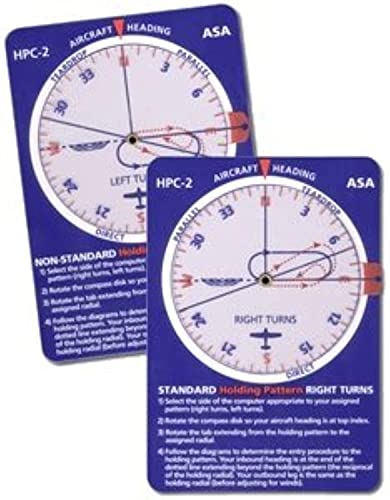
ASA Holding Pattern Computer
by ASA
$15.95
- FAA exam approved for knowledge tests
- Shows direct, parallel, and teardrop entries instantly
- Dual-sided for standard and non-standard patterns
6. ASA Paper E6B — Budget Pick and Essential Backup
The ASA Paper E6B performs every calculation the aluminum model does — time, speed, distance, wind correction, density altitude, true airspeed — at a fraction of the price. Made from heavyweight fiberboard, it is a legitimate flight planning tool, not a toy.
Why every instrument student should own one: Even if you buy the aluminum E6B as your primary manual flight computer, the paper E6B serves two critical roles:
-
Training tool: When you are first learning the E6B, you will make mistakes — misaligning the wind dot, reading the wrong scale, sliding too far. These mistakes are learning opportunities, but they are less frustrating on a $16 tool than a $42 one. Start on paper, graduate to aluminum.
-
Backup: Bring the paper E6B as a backup to both the knowledge test and the checkride. If your primary E6B is damaged, lost, or if the testing center questions your electronic model, you have a reliable fallback.
How it compares to the aluminum model:
- Same calculations: Both solve identical problems — the circular slide rule and wind side are functionally equivalent
- Less precision: Paper markings are slightly less fine than aluminum, meaning interpolation is marginally less accurate
- Less durability: Fiberboard will eventually wear, especially the wind side with repeated use. The aluminum model lasts forever.
- Less smooth: The paper model does not slide as freely as aluminum, which can slow you down during timed practice
Who should make this their primary E6B: Students on a very tight budget who need to allocate every dollar toward flight hours. The paper E6B will get you through the knowledge test and checkride — you can always upgrade to aluminum later. At $15.95, there is no reason not to have one in your flight bag.
Pros:
- Incredibly affordable at $15.95
- Same functions as the aluminum model
- Perfect training tool for learning E6B basics
- Ideal backup for exam day
- Lightweight and easy to carry
Cons:
- Fiberboard construction wears with heavy use
- Less precise markings than aluminum
- Does not slide as smoothly
- Will need replacement after extended use
- Not the tool you want to present to a DPE as your primary

ASA E6B Paper Flight Computer
by ASA
$15.95
- Same calculations as aluminum model at a fraction of the cost
- Heavyweight fiberboard construction
- Perfect backup or training E6B
How to Use the E6B for Common IFR Problems
Mastering these calculations is essential for both the knowledge test and the checkride. Here are the IFR-specific problems you will solve with your E6B:
Wind Correction Angle (Most Tested)
Problem: True course 270°, true airspeed 120 knots, winds aloft 310° at 25 knots. Find true heading and groundspeed.
On the manual E6B (wind side):
- Rotate the azimuth ring until 310 (wind direction) is at the top
- Mark a dot 25 units above the center grommet (wind speed)
- Rotate the azimuth ring until 270 (true course) is at the top
- Slide the card until the wind dot sits over the 120 TAS arc
- Read: wind correction angle is approximately 8° right, groundspeed approximately 108 knots
- True heading = 270 + 8 = 278°
On the ASA CX-3:
- Select Wind → Heading/GS
- Enter: Course = 270, TAS = 120, Wind Dir = 310, Wind Spd = 25
- Press Calculate → Heading: 278°, Groundspeed: 108 kts
The electronic E6B gives you the answer in 10 seconds. The manual E6B takes 30-45 seconds but proves you understand wind triangles — exactly what your DPE wants to see.
Density Altitude
Problem: Field elevation 5,000 feet, altimeter setting 29.72" Hg, outside air temperature 30°C. What is density altitude?
This is a critical IFR calculation because density altitude affects aircraft performance, approach speeds, and go-around capability — all especially important during instrument approaches.
On the manual E6B (calculator side):
- In the density altitude window, align pressure altitude (approximately 5,250 feet after correcting for non-standard pressure) with the OAT (30°C)
- Read density altitude from the window: approximately 8,200 feet
On the electronic E6B: Enter pressure altitude and temperature, get an instant answer.
Fuel Planning
Problem: 350 nautical mile IFR cross-country, groundspeed 130 knots, fuel burn 10 GPH. How much fuel is required, including 45-minute IFR reserve?
On the manual E6B:
- Calculator side: align 130 (speed) on the outer ring with 60 (minutes) on the inner ring
- Find 350 on the outer ring, read time on inner ring: 2 hours 41 minutes (161 minutes)
- Align 10 (GPH) on outer with 60 on inner
- Find 161 on inner, read fuel on outer: 26.8 gallons
- Add 45-minute reserve: 10 GPH × 0.75 hours = 7.5 gallons
- Total required: 34.3 gallons
What to Bring on Exam Day: Complete Checklist
Knowledge Test (PSI Testing Center)
- Government-issued photo ID — must match your FAA Integrated Airman Certification and Rating Application (IACRA) exactly
- Test authorization — endorsement from your CFII (Certificated Flight Instructor — Instrument)
- Electronic E6B (ASA CX-3 or Sporty's) — your primary calculation tool
- Manual E6B (aluminum or paper) — backup in case electronic is questioned
- IFR navigation plotter — for approach plate and en route chart questions
- Holding pattern computer — for quick entry determination on holding questions
- Extra batteries — for your electronic E6B (out of packaging)
- Mechanical pencil — for scratch work (testing center provides paper)
Note: PSI provides a built-in digital E6B on the test computer since September 2024. However, you should still bring your own tools. If the proctor questions any item, politely reference FAA Advisory Circular AC 60-11C, which explicitly permits electronic flight computers on knowledge tests.
Checkride (Oral and Flight)
- Manual E6B (aluminum recommended) — your primary tool for the oral exam
- Electronic E6B — supplement for the flight portion
- IFR navigation plotter — for chart and approach plate discussion
- Holding pattern computer — for holding entry determination
- Current IFR en route charts (low altitude)
- Current approach plates for airports in your planned route
- Aircraft POH/AFM — with weight and balance data
- Aircraft maintenance records — airworthiness directives, annual, 100-hour, transponder, pitot-static, ELT
- Your pilot certificate and medical certificate
- Logbook with instrument time and approaches logged
- IACRA application — completed and signed by your CFII
- View-limiting device — foggles or hood for the flight portion
- Current weather briefing for your planned route
- Completed navlog — flight plan with all calculations shown
IFR Regulatory References
These FAA documents govern what tools are permitted and what you are expected to know:
- AC 60-11C — Test Aids and Materials That May Be Used by Airman Knowledge Testing Applicants. This advisory circular confirms that electronic flight computers are permitted on all FAA knowledge tests.
- FAA-S-ACS-8B — Instrument Rating Airman Certification Standards. This is the official standard your DPE uses to evaluate you on the checkride. It lists every task, knowledge area, and skill you must demonstrate.
- 14 CFR Part 61.65 — Instrument Rating requirements. Specifies the aeronautical experience and knowledge requirements for the Instrument Rating.
- AIM Chapter 1, Section 1-1-21 — Holding Procedures. The official FAA guidance on holding pattern entries and procedures.
Common Mistakes Instrument Students Make with the E6B
Avoid these pitfalls during your training:
-
Relying solely on the electronic E6B. Your DPE will ask you to use the manual E6B. If you have only practiced on the electronic version, you will struggle during the oral exam.
-
Not practicing under time pressure. The knowledge test gives you approximately 2 minutes per question. Practice solving wind problems in under 60 seconds on the manual E6B and under 15 seconds on the electronic.
-
Forgetting magnetic variation. The E6B works with true course and true heading. You must apply magnetic variation to convert to magnetic heading — a step that is easy to forget under exam pressure.
-
Misreading the wind side. The most common manual E6B error is misaligning the wind dot. Always double-check that your wind direction is set before marking the speed.
-
Ignoring density altitude. IFR students focus on wind calculations but forget that density altitude affects approach speeds, missed approach climb performance, and alternate planning. Practice density altitude calculations until they are automatic.
-
Skipping the holding pattern computer. Some students try to determine holding entries purely from memory. While you should understand the theory, the holding pattern computer eliminates errors on the knowledge test and provides a quick verification during the checkride.
Free Instrument Rating Exam Prep Resources
A quality E6B flight computer is essential, but it is only one part of your preparation. Pair it with comprehensive study materials:
- Free Instrument Rating Study Guide — Complete coverage of all IFR topics in the ACS
- Free Instrument Rating Practice Questions — Unlimited attempts with detailed answer explanations
- AI Tutor — 10 free questions per day — ask it to walk you through E6B problems, holding pattern entries, or IFR procedures step by step
- Instrument Rating Practice Questions — Key IFR concepts, regulations, and procedures
The AI tutor is particularly valuable for instrument students. Ask it questions like "Walk me through how to calculate wind correction angle on a manual E6B" or "Explain when to use a teardrop entry vs a parallel entry for a holding pattern" and it will give you detailed, step-by-step guidance.
Final Verdict: What to Buy for the Instrument Rating
For most instrument students, here is the optimal toolkit:
| Tool | Model | Price | Why |
|---|---|---|---|
| Electronic E6B | ASA CX-3 Pathfinder | $129.95 | Fastest calculations for knowledge test + career use |
| Manual E6B | ASA Metal E6B | $41.95 | Checkride requirement + deepest understanding |
| IFR Plotter | ASA Instrument Plotter | $12.95 | Purpose-built for IFR charts |
| Holding Pattern | ASA Holding Pattern Computer | $15.95 | Eliminates #1 checkride bust item |
| Total | — | $200.80 | Complete IFR tool kit |
On a budget? Replace the CX-3 with Sporty's Electronic E6B ($99.95) and the metal E6B with the paper E6B ($15.95) — your total drops to $144.80 with no loss in functionality for the exams.
The most important thing is not which E6B you buy — it is how much you practice with it. Start using your E6B from Day 1 of instrument training. Use it for every cross-country planning exercise, every wind problem in ground school, and every practice knowledge test. By the time you sit for the IRA exam and walk into the checkride, the E6B should feel like an extension of your hand.
Start your Instrument Rating preparation today with our free Instrument Rating study guide and practice questions.
As an Amazon Associate, OpenExamPrep earns from qualifying purchases. All recommendations are based on editorial review.

 Free CE