 View
ViewWhy Your Calculator Choice Matters for the CFP Exam
The CFP exam tests your ability to perform complex financial calculations under time pressure. Across 170 questions in two 3-hour sessions, you will solve time-value-of-money problems, compare uneven cash flows, calculate loan amortization schedules, and evaluate investment returns — all with a financial calculator.
Unlike the CPA or Series 7 exams (which provide on-screen calculators and prohibit personal devices), the CFP Board requires you to bring your own calculator. Choose the wrong one, and you waste precious minutes fumbling with unfamiliar keys. Choose the right one, and calculations become second nature.
Here is the critical detail most guides get wrong: the CFP Board requires you to clear your calculator's memory before each exam section — proctors inspect the calculator but will not reset it for you, and you are responsible for restoring your own settings afterward. That means reconfiguring payments per year, decimal precision, and begin/end mode from scratch — twice. Choosing a calculator you can reset in 20 seconds matters more than most candidates realize.
Complete List of CFP Board-Approved Calculators
The CFP Board publishes an official calculator policy listing exactly which models are permitted. Here is the complete list as of 2026:
Texas Instruments:
- TI BA II Plus
- TI BA II Plus Professional
- TI BA II Plus Business Analyst (same as standard BA II Plus, older branding)
Hewlett-Packard:
- HP 10B (discontinued)
- HP 10Bii (discontinued)
- HP 10Bii+
- HP 12C
- HP 12C Platinum
- HP 17Bii+
Sharp:
- Sharp EL-733 (discontinued)
- Sharp EL-733a (discontinued)
- Sharp EL-738 (discontinued)
Important: The CFP Board states that newer or older versions of approved models are also acceptable. However, models not on this list — including graphing calculators, CAS calculators, and phone/tablet apps — are strictly prohibited.
Bottom line: Of the 12 approved models, only 6 are currently available new. The HP 10B, HP 10Bii, all three Sharp models, and the older TI BA II Plus Business Analyst (the original branding of today's BA II Plus) are effectively discontinued. Do not waste time hunting for them.
Side-by-Side Comparison
| Calculator | Price | Entry Mode | Cash Flows | Also CFA-Approved? | Best For |
|---|---|---|---|---|---|
| TI BA II Plus | $36.49 | Algebraic | 24 uneven | Yes | Most candidates |
| HP 10bII+ | $32.95 | Algebraic | 15 uneven | No | Beginners / budget |
| TI BA II Plus Pro | $36.49 | Algebraic | 32 uneven | Yes | Power users |
| HP 12C | $34.99 | RPN | 80 uneven | Yes | Finance professionals |
| HP 17bII+ | $69.99 | Both (RPN + Algebraic) | 40+ uneven | No | Career versatility |
| HP 12C Platinum | $74.90 | Both (RPN + Algebraic) | 80 uneven | Yes | Premium HP experience |
Notation explained: Algebraic entry works like a standard calculator (press 2 + 3 =). RPN (Reverse Polish Notation) eliminates the equals key — you enter 2, press ENTER, enter 3, press + and get the result. RPN is faster for chained calculations but has a learning curve.
Our Top 6 CFP Exam Calculators for 2026
1. TI BA II Plus — Best Overall
The TI BA II Plus is the most popular calculator among CFP candidates, and for good reason. Its algebraic entry system works exactly like you would expect a calculator to work — no special notation to learn. Every CFP review course (Kaplan, Dalton, Danko, Zahn) teaches keystrokes for this model, which means you will never lack for instructional resources.
Why CFP candidates love it: The prompted display shows you which variable you are entering (N, I/Y, PV, PMT, FV), eliminating the guesswork that plagues beginners. You solve a TVM problem by entering the known variables and pressing CPT + the unknown variable. It is intuitive even if you have never touched a financial calculator before.
Key specs for CFP:
- 24 uneven cash flows with up to 4-digit frequencies
- NPV and IRR at the press of a button
- Bond price and yield calculations
- 4 depreciation methods (SL, SYD, DB, DB with SL crossover)
- Amortization schedules
- 10 memory registers
Also approved for: CFA Level I, II, and III; FRM; CMA — making it the best choice if you plan to pursue additional designations after the CFP.
Pros:
- Easiest to learn — algebraic entry, prompted display
- Every CFP review course teaches this model
- Also approved for CFA, FRM, and CMA exams
- Strong community support and free YouTube tutorials
- Same price as the Professional version
Cons:
- 24 uneven cash flows (sufficient for CFP, but the Professional offers 32)
- Plastic build feels less premium than HP models
- No RPN option
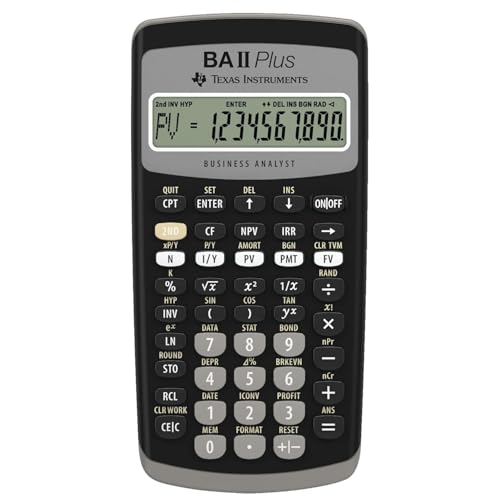
Texas Instruments BAII Plus Financial Calculator, Black
by Texas Instruments
$36.49
- Solves TVM calculations: annuities, mortgages, leases, savings
- Cash flow analysis with up to 24 uneven streams — calculates NPV and IRR
- Bond pricing, depreciation (4 methods), and amortization schedules
2. HP 10bII+ — Best for Beginners
If you have never used a financial calculator and want the gentlest learning curve at the lowest price, the HP 10bII+ is your calculator. It uses standard algebraic entry, has an intuitive keyboard layout, and includes over 100 built-in functions — more than enough for every CFP exam question.
Why beginners choose it: The HP 10bII+ was specifically designed to be approachable. Keys are logically grouped, the display shows clear labels, and most functions require minimal keystrokes. Several CFP review programs (including Boston Institute of Finance) teach using this model.
Key specs for CFP:
- Over 100 built-in financial functions
- TVM, NPV, IRR, amortization
- 15 uneven cash flow entries
- Bond calculations
- Probability distributions
- 1 line display with 12 digits
Pros:
- Most affordable CFP-approved calculator (~$33)
- Easiest to learn from scratch
- Clean, uncluttered keyboard layout
- Good build quality with responsive keys
- Battery lasts years with normal use
Cons:
- Only 15 uneven cash flows (lowest of any available model)
- Not CFA-approved — if you pursue CFA later, you will need a different calculator
- Fewer online tutorials compared to TI BA II Plus
- Single-line display

HP 2716570 10bII+ Financial Calculator, 12-Digit LCD
by HP
$32.95
- Over 100 built-in functions including probability distributions
- Intuitive keyboard layout with minimal keystrokes required
- Easy-to-read display with adjustable contrast and on-screen labels
3. TI BA II Plus Professional — Best for Power Users
The Professional edition of the BA II Plus adds several advanced functions that go beyond what the standard model offers — and as of 2026, it costs the exact same price ($36.49). If you are buying new, there is almost no reason to get the standard over the Professional.
What the Professional adds:
- 32 uneven cash flows (vs 24 on standard) — useful for complex CFP scenarios
- Net Future Value (NFV) — calculate the future value of uneven cash flows directly
- Modified Internal Rate of Return (MIRR) — accounts for reinvestment rate, a more realistic measure
- Modified Duration — important for fixed-income questions
- Payback Period and Discounted Payback — common capital budgeting metrics
Why choose the Professional over the standard? Every keystroke you already know on the standard works identically on the Professional. The additional functions are simply extra — they never get in the way. Given the identical pricing, the Professional is strictly superior.
Key specs for CFP:
- Everything the standard BA II Plus does, plus the features above
- 32 uneven cash flows with 4-digit frequencies
- Brushed metal faceplate (slightly more premium feel)
- Improved display readability
Pros:
- Same price as the standard BA II Plus
- 32 uneven cash flows (most of any TI model)
- NFV, MIRR, Modified Duration, Payback — all useful for CFP
- Identical keystrokes to standard model
- Also CFA, FRM, and CMA approved
Cons:
- Harder to find in physical retail stores
- Some CFP review courses teach the standard, not the Professional (keystrokes are the same, but screenshots may differ)
- Same plastic build as the standard

Texas Instruments BA II Plus Professional Financial Calculator
by Texas Instruments
$36.49
- 32 uneven cash flows with up to 4-digit frequencies (vs 24 on standard)
- NFV, MIRR, Modified Duration, Payback, and Discounted Payback
- Prompted display guides you through financial calculations
4. HP 12C — The Industry Legend
The HP 12C has been in continuous production since 1981 — the longest-running calculator model in history. It is the gold standard on Wall Street, in commercial real estate, and in private banking. If you already use one at work, bringing it to the CFP exam is a no-brainer.
The RPN question: The HP 12C uses Reverse Polish Notation exclusively. Instead of pressing "100 + 50 =", you press "100 ENTER 50 +". This feels alien at first but becomes significantly faster for chained calculations — you never need parentheses. Most HP 12C users will tell you they cannot imagine going back to algebraic entry.
Key specs for CFP:
- 80 uneven cash flows (most of any CFP-approved model)
- 120+ built-in financial functions
- Programmable keystroke sequences (up to 203 program lines)
- TVM, NPV, IRR, amortization, bond calculations
- 20 memory registers
- Legendary build quality — all-metal construction
Who should choose the HP 12C: Finance professionals who already know RPN, candidates who value build quality, and anyone who wants a calculator that will last their entire career. The HP 12C you buy for the CFP exam will still be working when you retire.
Pros:
- Industry-standard in finance — recognized and respected everywhere
- 80 uneven cash flows — far more than you will ever need for CFP
- Programmable — automate repetitive calculations
- Premium build quality, legendary durability
- Also CFA and FRM approved
Cons:
- RPN-only — significant learning curve if you have never used it
- Fewer CFP-specific tutorials (most courses teach TI BA II Plus or HP 10bii+)
- Single-line display (no prompted variable labels)
- Some functions require more keystrokes than TI models

HP 12C Financial Calculator – 120+ Functions: TVM, NPV, IRR, Amortization, Bond Calculations, Programmable Keys (HP)
by HP
$34.99
- Industry standard since 1981 — trusted by finance professionals for 40+ years
- 120+ built-in functions: TVM, NPV, IRR, amortization, bond calculations
- Programmable keys for automating repetitive calculations
5. HP 17bII+ — Most Versatile
The HP 17bII+ is the Swiss Army knife of CFP-approved calculators. With 250+ functions, a built-in equation solver, and the ability to switch between RPN and algebraic entry, it is the most capable calculator on this list. It is also the only approved model with a 2-line display showing both input and result simultaneously.
What makes it unique: The HP 17bII+ includes an equation solver that lets you enter custom formulas and solve for any variable. This goes beyond preset TVM — you can program complex financial planning formulas and reuse them throughout the exam. The 2-line display means you can verify your input before calculating.
Key specs for CFP:
- 250+ built-in functions for business, finance, and statistics
- Switchable RPN / algebraic entry
- Built-in equation solver (custom formulas)
- 2-line display (input + result)
- 28KB user memory
- TVM, NPV, IRR, amortization, bond, depreciation
- Includes protective case and cleaning cloth
Pros:
- Most functions of any CFP-approved calculator (250+)
- Dual entry modes — use algebraic or RPN, your choice
- Equation solver for custom financial planning formulas
- 2-line display for easier verification
- Professional presentation with included case
Cons:
- $69.99 — second most expensive option
- Not CFA-approved (CFA only allows TI BA II Plus and HP 12C)
- Fewer online tutorials and study resources
- More functions means more complexity — can be overwhelming

HP 17bII+ Financial Calculator – 250+ Professional Functions for Business, Finance & Accounting – RPN, Algebraic Entry, College Math Solver, 2-Line Display, 28KB Memory – Includes Case, Cleaning Cloth
by HP
$69.99
- 250+ professional functions for business, finance, and accounting
- Switchable RPN and algebraic entry — use whichever you prefer
- Built-in equation solver and 2-line display with 28KB memory
6. HP 12C Platinum — Best Premium Option
The HP 12C Platinum takes the legendary HP 12C and adds the flexibility of dual-mode entry (RPN + algebraic), more memory, and a faster processor. It is the premium choice for candidates who want the HP 12C ecosystem but do not want to commit to RPN-only.
What the Platinum adds over the standard HP 12C:
- Toggle between RPN and algebraic entry
- Faster ARM processor (noticeably quicker on complex calculations)
- More memory for programming
- Undo/backspace key (the standard HP 12C lacks this)
Key specs for CFP:
- Same 80 uneven cash flows and 120+ functions as HP 12C
- Dual RPN/algebraic entry mode
- Enhanced programming capabilities
- TVM, NPV, IRR, amortization, bond calculations
Pros:
- Best of both worlds — RPN speed when you want it, algebraic when you don't
- Faster processor than the standard HP 12C
- Undo key saves time when you make entry errors
- CFA and FRM approved
- Same legendary HP build quality
Cons:
- Most expensive option at $74.90
- Harder to find in stock (limited availability)
- Overkill for most CFP candidates
- Weighs slightly more than the standard HP 12C
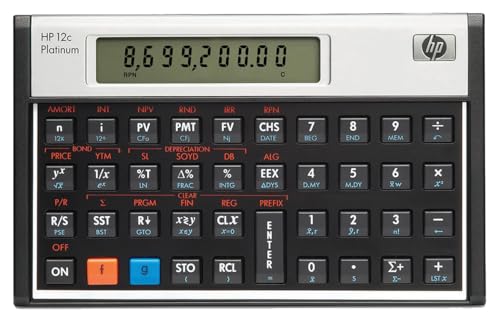
HP 12CP Financial Calculator
by HP
$74.90
- Toggle between RPN and algebraic entry modes
- 120+ built-in functions with faster ARM processor
- Undo/backspace key — fix entry errors without starting over
Which Calculator Should You Choose?
Use this decision framework to pick the right calculator for your situation:
Are you new to financial calculators? → Get the HP 10bII+ ($32.95) for the easiest learning curve, or the TI BA II Plus ($36.49) for the widest tutorial support.
Do you already use a financial calculator at work? → Stick with whatever you already know. Muscle memory matters under exam pressure.
Are you planning to also pursue the CFA designation? → Get the TI BA II Plus Professional ($36.49). It is approved for both CFP and CFA, and the Professional features are a free bonus at the same price.
Do you prefer HP calculators and know RPN? → Get the HP 12C ($34.99). If you want algebraic mode as a fallback, get the HP 12C Platinum ($74.90).
Do you want the most capable calculator possible? → Get the HP 17bII+ ($69.99). Its equation solver and 250+ functions handle anything the CFP exam can throw at you.
Our overall recommendation: For most candidates, the TI BA II Plus Professional at $36.49 is the best value. You get the most popular CFP calculator with extra features at zero additional cost, and it is also approved for CFA, FRM, and CMA exams.
CFP vs CFA Calculator Overlap
Many financial professionals pursue both the CFP and CFA designations. If this applies to you, your calculator choice matters:
| Calculator | CFP-Approved | CFA-Approved | Both? |
|---|---|---|---|
| TI BA II Plus | Yes | Yes | Yes |
| TI BA II Plus Professional | Yes | Yes | Yes |
| HP 12C | Yes | Yes | Yes |
| HP 12C Platinum | Yes | Yes | Yes |
| HP 10bII+ | Yes | No | No |
| HP 17bII+ | Yes | No | No |
If you might pursue both certifications, choose a calculator approved for both. The TI BA II Plus Professional is the safest bet — it covers CFP, CFA, FRM, and CMA.
How to Reset Your Calculator After Memory Clear
The CFP Board requires you to clear your calculator's memory before each exam section, and you must restore your own settings afterward (proctors will not do it for you). Here is how to reconfigure the critical settings on the three most popular models:
TI BA II Plus / Professional
- Press 2ND → FORMAT → set decimal places to 4 → press ENTER → 2ND → QUIT
- Press 2ND → P/Y → enter 1 → press ENTER → press ↓ → enter 1 → press ENTER → 2ND → QUIT
- Press 2ND → BGN → if it shows "BGN", press 2ND → SET to switch to "END" → 2ND → QUIT
Translation: 4 decimal places, 1 payment per year, 1 compounding period per year, END mode. Total time: ~15 seconds.
HP 10bII+
- Press and hold C for 1 second (master clear)
- Press 1 → SHIFT → P/YR (sets 1 payment per year)
- Press SHIFT → DISP → 4 (sets 4 decimal places)
- Verify END mode (no "BEGIN" annunciator on display)
Total time: ~10 seconds.
HP 12C
- Press f → CLx (clears all)
- Press f → 4 (sets 4 decimal places)
- The HP 12C defaults to 1 P/YR in its native mode — verify with g → 12÷ which should show 1.0000
- Verify END mode (g → END if "BEGIN" is displayed)
Total time: ~10 seconds.
Pro tip: Practice this reset process 10 times before exam day. On the actual exam, you want it to be pure muscle memory — you should not need to think about it at all.
Exam Day Calculator Checklist
Use this checklist the night before and morning of your CFP exam:
- Primary calculator — fully charged / fresh batteries installed
- Backup calculator — same model recommended, also with fresh batteries
- Extra batteries — out of original packaging (some proctors prohibit sealed packaging at the desk)
- Tape or sticker — cover any formulas printed on the back of your calculator (CFP Board requirement)
- Practice memory clear + reset — do it one final time at home to confirm muscle memory
- Verify settings after reset — P/Y = 1, C/Y = 1, END mode, 4+ decimal places
- Confirm it is an approved model — check the exact model name on the CFP Board list
- Remove any stickers or labels — besides the one covering back-panel formulas
- Clean the screen and keys — a smudged screen wastes time squinting at numbers
Keystroke Comparison: Same Problem, Three Calculators
Problem: What is the future value of $10,000 invested at 7% annual interest for 20 years?
Expected answer: $38,696.84
TI BA II Plus
20 [N]  7 [I/Y]  10000 [+/-] [PV]  0 [PMT]  [CPT] [FV]
→ Display: 38,696.84
HP 10bII+
20 [N]  7 [I/YR]  10000 [+/-] [PV]  0 [PMT]  [FV]
→ Display: 38,696.84
HP 12C (RPN)
20 [n]  7 [i]  10000 [CHS] [PV]  0 [PMT]  [FV]
→ Display: 38,696.84
Notice how similar the keystrokes are across all three. The main difference is the HP 12C uses CHS (change sign) instead of +/-, and you do not press a separate CPT (compute) key — pressing FV directly computes the answer.
A Note on Discontinued Models
Three Sharp models (EL-733, EL-733a, EL-738) and two older HP models (HP 10B, HP 10Bii without the "+") remain on the CFP Board approved list but are no longer manufactured. If you already own one of these and are comfortable with it, you can absolutely use it on the exam. But do not buy a used discontinued calculator for the CFP exam — you risk receiving a defective unit with no warranty, and replacement batteries may be hard to find.
Free CFP Exam Prep Resources
A great calculator is only part of the equation. Pair it with solid study materials:
- Free CFP Study Guide — Complete content coverage across all CFP principal knowledge domains
- Free CFP Practice Questions — Unlimited attempts with detailed answer explanations
- AI Tutor — 10 free questions per day — ask it to walk you through calculator keystrokes for any problem
- CFP Flashcards — Key formulas, concepts, and definitions
The AI tutor is especially useful for calculator practice. Ask it questions like "Walk me through how to solve an NPV problem on the TI BA II Plus" or "How do I calculate bond yield-to-maturity on the HP 12C?" and it will give you step-by-step keystroke instructions.
Final Verdict
For most CFP candidates, the TI BA II Plus Professional ($36.49) is the best choice. It is the same price as the standard model with strictly more features, every review course teaches its keystrokes, it is approved for CFA/FRM/CMA if you pursue additional designations, and it has the widest community support.
If you are on a tight budget, the HP 10bII+ ($32.95) saves a few dollars and is the easiest to learn from scratch.
If you are already an HP 12C user, do not switch — exam day is not the time to relearn muscle memory.
Whichever calculator you choose, the most important thing is to practice with it daily until the keystrokes are automatic. Buy it early, use it for every homework problem and practice question, and walk into the exam with total confidence.
Start your CFP exam preparation today with our free CFP study guide and practice questions.
As an Amazon Associate, OpenExamPrep earns from qualifying purchases. All recommendations are based on editorial review.

 Course Playlist
 Free CE
 Online course on Mometrix
 Take courses on Udemy
 Exam information on Achievable