 View
ViewWhy Your Calculator Matters More on the FRM Than Almost Any Other Exam
The FRM is one of the most quantitatively demanding professional finance exams in the world. Part I throws 100 multiple-choice questions at you in 4 hours, covering quantitative analysis, financial markets, valuation models, and risk management foundations. Part II follows with 80 questions in 4 hours on market risk measurement, credit risk modeling, operational risk, and investment risk management. Nearly every question requires numerical computation.
This is not the CFP exam where you might have a mix of conceptual, regulatory, and calculation questions. The FRM is wall-to-wall math: bond duration and convexity, Value at Risk (VaR) calculations, options Greeks, interest rate sensitivity, Monte Carlo parameters, and credit risk models. Your calculator is not just a tool — it is your most important exam-day asset.
Here is a detail many guides get wrong: GARP's official exam-day policy does not require proctors to clear your calculator memory. What GARP does guarantee is that every calculator is inspected before you enter the testing room, and a proctor can ask you to reset yours on the spot. Either way, you want your preferred settings (payments per year, decimal precision, begin/end mode) reconfigured in seconds, not minutes — pace matters enormously on an exam this quantitative.
GARP's Approved Calculator List: More Models Than Most Guides Mention
Most FRM calculator round-ups (including earlier versions of this one) describe only 4 approved models — the same list CFA Institute uses. That is incomplete. GARP's own Exam Policies page lists three calculator families, and one of them regularly gets left off competitor articles:
Texas Instruments:
- TI BA II Plus
- TI BA II Plus Professional
Hewlett-Packard (12C family):
- HP 12C
- HP 12C Platinum
- HP 12C Platinum 25th Anniversary Edition
- HP 12C 30th Anniversary Edition
- HP12C Prestige
Hewlett-Packard (older business calculators):
- HP 10B II
- HP 10BII+
- HP 20B
No Sharp calculators. No HP 17bII+. No graphing calculators. No phone apps or programmable models. GARP's policy is unambiguous: "There will be no exceptions to this policy. Should a candidate use a non-authorized calculator at any time during the Exam, their Exam will not be graded."
Why this matters for your wallet: GARP's list is actually broader than CFA Institute's. CFA candidates can only use the TI BA II Plus family and the HP 12C family. If you already own an HP 10bII+ — from a CFP exam, an old job, or a college finance course — it is valid for the FRM even though it is not valid for the CFA exam. You may not need to buy anything new.
Side-by-Side Comparison of the GARP-Approved Calculators
| Calculator | Price | Entry Mode | Cash Flows | Modified Duration? | Best For |
|---|---|---|---|---|---|
| TI BA II Plus Pro | $36.49 | Algebraic | 32 uneven | Built-in | Most FRM candidates |
| TI BA II Plus | $36.49 | Algebraic | 24 uneven | Manual calc | Budget-conscious / already own it |
| HP 12C | $34.99 | RPN only | 80 uneven | Manual calc | Finance professionals who know RPN |
| HP 12C Platinum | $74.90 | Both (RPN + Algebraic) | 80 uneven | Manual calc | Premium HP experience |
| HP 10bII+ | Usually the least expensive GARP-approved option | Both (RPN + Algebraic) | Uneven cash flow list | Manual calc | Candidates who already own one from a CFP exam or prior job |
GARP also still lists the discontinued HP 10B II and HP 20B as approved — fine if you already own one, but neither is worth buying new since the 10bII+ replaced the 10B II in 2011 and is far easier to find in stores today.
Notation explained: Algebraic entry works like a standard calculator (press 2 + 3 =). RPN (Reverse Polish Notation) eliminates the equals key — you enter 2, press ENTER, enter 3, press + and get the result. RPN is faster for chained calculations but has a learning curve.
Key observation: The TI BA II Plus Professional is the only model with a built-in Modified Duration function — a calculation that appears frequently on both FRM Part I and Part II. On the other three models, you must calculate it manually from Macaulay Duration. This alone makes the Professional the top recommendation for FRM candidates.
FRM vs CFA Calculator Policies: What You Need to Know
Many FRM candidates also hold or are pursuing the CFA charter. Here is how the calculator policies actually compare — and where they differ:
| Policy | FRM (GARP) | CFA (CFA Institute) | CFP (CFP Board) |
|---|---|---|---|
| Named approved models | 10 | 7 | 11 |
| TI BA II Plus | Yes | Yes | Yes |
| TI BA II Plus Pro | Yes | Yes | Yes |
| HP 12C (+ Platinum/anniversary editions) | Yes | Yes | Yes |
| HP 10B II | Yes | No | Yes |
| HP 10bII+ | Yes | No | Yes |
| HP 20B | Yes | No | Not listed |
| HP 17bII+ | No | No | Yes |
| Sharp EL-733/733a/738 | No | No | Yes |
| Backup calculator allowed? | Yes | Yes | Yes |
Bottom line: FRM and CFA share the same core 4 models (TI BA II Plus family + HP 12C family), but GARP's list is actually broader than CFA Institute's because it also approves the older HP 10B II, HP 10BII+, and HP 20B. CFP Board's list is the broadest overall at 11 named models. If you already own a CFA-, CFP-, or FRM-approved TI or HP calculator, check this table before buying a new one — there is a good chance you are already covered. For most candidates buying new, the TI BA II Plus Professional remains the best all-around choice since it is approved everywhere and has the deepest FRM-specific feature set.
Our Top FRM Exam Calculators for 2026 (Plus a Budget-Approved Option)
1. TI BA II Plus Professional — Best Overall for FRM
The TI BA II Plus Professional is purpose-built for quantitative finance exams. Its algebraic entry system is intuitive, every FRM review provider (Bionic Turtle, Kaplan, AnalystPrep, GARP's own study materials) teaches keystrokes for this model, and it includes a built-in Modified Duration function that the standard BA II Plus lacks.
Why FRM candidates choose it: The FRM exam hammers you with fixed-income risk questions — bond duration, convexity, DV01, key rate duration. The Professional's built-in Modified Duration saves multiple keystrokes per problem compared to the standard model, where you would need to first calculate Macaulay Duration and then manually convert. Over 100 questions in Part I, those saved keystrokes add up.
Key specs for FRM:
- 32 uneven cash flows with up to 4-digit frequencies
- Built-in Modified Duration — critical for FRM fixed-income questions
- NPV and IRR for project valuation questions
- Net Future Value (NFV) and Modified IRR (MIRR)
- Bond price and yield-to-maturity calculations
- Payback Period and Discounted Payback
- 10 memory registers for intermediate calculations
- Prompted display shows which variable you are entering (N, I/Y, PV, PMT, FV)
FRM-specific advantages:
- Modified Duration is a one-step function (not available on the standard BA II Plus)
- 32 cash flows handle complex bond and swap valuation scenarios
- Memory registers let you store intermediate VaR and Greeks calculations
- Same keystrokes work for CFA exam if you pursue both designations
Pros:
- Same price as the standard BA II Plus ($36.49)
- Built-in Modified Duration — the single most FRM-relevant extra feature
- Every major FRM prep provider teaches this model's keystrokes
- Also approved for CFA, CFP, and CMA exams
- Prompted display eliminates variable-entry guesswork
- Strongest community support (forums, YouTube tutorials, Reddit)
Cons:
- Plastic build feels less premium than HP 12C
- No RPN option (algebraic only)
- 32 cash flows maximum (HP 12C handles 80, though you rarely need more than 20 on the FRM)

Texas Instruments BA II Plus Professional Financial Calculator
by Texas Instruments
$36.49
- 32 uneven cash flows with up to 4-digit frequencies
- NFV, MIRR, Modified Duration, Payback, and Discounted Payback calculations
- Prompted display guides you through financial calculations
2. TI BA II Plus — Best if You Already Own One
The standard TI BA II Plus is functionally identical to the Professional for 95% of FRM calculations. If you already own this model from a college finance course or CFA prep, there is no urgency to upgrade — the Professional's extra features (Modified Duration, NFV, MIRR) are useful but not essential.
Why it works for FRM: All the core functions you need — TVM, NPV, IRR, bond pricing, amortization — work identically to the Professional. The 24 uneven cash flows are more than sufficient for any FRM exam question. The prompted display guides you through every calculation. And every keystroke tutorial written for the TI BA II Plus family applies to this model.
Key specs for FRM:
- 24 uneven cash flows with up to 4-digit frequencies
- NPV and IRR calculations
- Bond price and yield calculations
- 4 depreciation methods
- Amortization schedules
- 10 memory registers
When to stick with the standard: If you have been practicing with this calculator for months and the FRM exam is weeks away, do not switch. Muscle memory under exam pressure is more valuable than a built-in Modified Duration key. You can calculate Modified Duration manually: divide Macaulay Duration by (1 + yield/frequency). It adds one extra step per problem — manageable.
Pros:
- Easiest to learn — algebraic entry, prompted display
- Identical keystrokes to Professional for all core functions
- Every FRM review course covers this model
- Also approved for CFA, CFP, and CMA exams
- Widely available in retail stores and online
Cons:
- 24 uneven cash flows (vs 32 on Professional)
- No built-in Modified Duration (must calculate manually)
- No NFV, MIRR, or Payback Period functions
- Same price as the Professional — buying new, the Professional is strictly better value
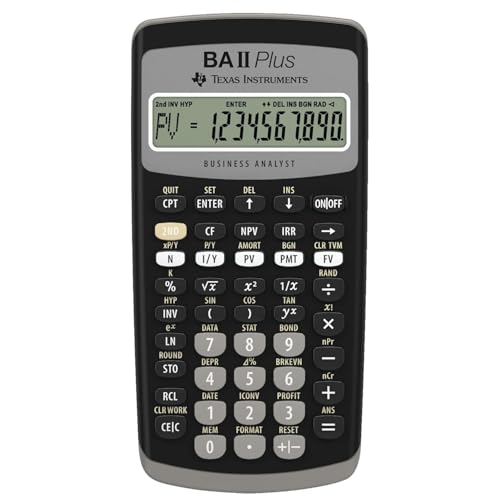
Texas Instruments BAII Plus Financial Calculator, Black
by Texas Instruments
$36.49
- Solves TVM calculations: annuities, mortgages, leases, savings
- Cash flow analysis with up to 24 uneven streams — calculates NPV and IRR
- Bond pricing, depreciation (4 methods), and amortization schedules
3. HP 12C — The Wall Street Standard
The HP 12C has been the calculator of choice on Wall Street and in commercial banking since 1981. If you are a working risk manager, quant, or fixed-income analyst, there is a good chance you already have one on your desk. Its all-metal construction, legendary durability, and 80 uneven cash flow capacity make it the premium choice for career finance professionals.
The RPN factor for FRM: The HP 12C uses Reverse Polish Notation exclusively. For chained calculations — which the FRM demands constantly — RPN is genuinely faster. Calculating a bond's convexity requires multiple intermediate results: you compute each cash flow's present value, multiply by t(t+1), sum them, and divide by the price times (1+y)^2. In RPN, each intermediate result stays on the stack. In algebraic mode, you need to store intermediates in memory registers or write them down. Experienced RPN users have a measurable speed advantage on computation-heavy exams.
Key specs for FRM:
- 80 uneven cash flows (most of any approved model)
- 120+ built-in financial functions
- Programmable keystroke sequences (up to 203 program lines)
- TVM, NPV, IRR, amortization, bond calculations
- 20 memory registers (twice the TI models)
- Premium all-metal construction
Who should choose the HP 12C for FRM: Risk professionals who already use RPN daily, candidates who value the 20 memory registers for complex multi-step calculations, and anyone who wants a calculator that doubles as a career tool long after the exam.
Pros:
- Industry-standard in finance — the calculator on every trading desk
- 80 uneven cash flows — handles any complexity
- 20 memory registers — double the TI models, critical for multi-step FRM calculations
- Programmable — automate repetitive risk calculations
- RPN is genuinely faster for chained computations
- Also approved for CFA and CFP exams
- Legendary build quality — will outlast your career
Cons:
- RPN-only — significant learning curve if you have never used it (3-4 weeks to become proficient)
- Fewer FRM-specific tutorials (most prep courses teach the TI BA II Plus)
- Single-line display with no prompted variable labels
- No built-in Modified Duration
- Some functions require more keystrokes than TI models

HP 12C Financial Calculator – 120+ Functions
by HP
$34.99
- Industry standard since 1981 — trusted by finance professionals for 40+ years
- 120+ built-in functions: TVM, NPV, IRR, amortization, bond calculations
- Programmable keys for automating repetitive calculations
4. HP 12C Platinum — Best Premium Option
The HP 12C Platinum adds flexibility to the legendary HP 12C platform: you can toggle between RPN and algebraic entry, it has a faster ARM processor, more programming memory, and an undo/backspace key that the standard HP 12C lacks. It is the only GARP-approved calculator that gives you both entry modes.
What the Platinum adds over the standard HP 12C:
- Toggle between RPN and algebraic entry at any time
- Faster ARM processor (noticeably quicker on complex calculations)
- More memory for programming sequences
- Undo/backspace key — fix entry errors without restarting the problem
Why FRM candidates consider it: If you are intrigued by RPN's speed advantages for the FRM's chained calculations but nervous about committing to RPN-only, the Platinum gives you a safety net. Start with algebraic mode, practice RPN during your study period, and use whichever feels more natural on exam day. The faster processor also matters — on complex bond pricing calculations with many cash flows, the Platinum computes noticeably faster than the standard HP 12C.
Key specs for FRM:
- Same 80 uneven cash flows and 120+ functions as HP 12C
- Dual RPN/algebraic entry mode
- Enhanced programming capabilities
- TVM, NPV, IRR, amortization, bond calculations
- 20 memory registers
Pros:
- Best of both worlds — RPN speed when you want it, algebraic when you don't
- Faster processor than the standard HP 12C
- Undo key saves time on entry errors (which happen under exam pressure)
- Same 80 cash flows and 20 memory registers as the standard HP 12C
- Also approved for CFA and CFP exams
- Premium HP build quality
Cons:
- Most expensive option at $74.90 — more than double the TI BA II Plus Professional
- Harder to find in stock (limited retail availability)
- Still no built-in Modified Duration
- The dual-mode capability can cause confusion if you accidentally switch modes during the exam
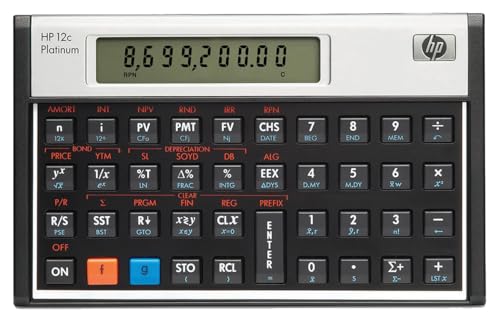
HP 12CP Financial Calculator
by HP
$74.90
- Toggle between RPN and algebraic entry modes
- 120+ built-in functions with faster ARM processor
- Undo/backspace key — fix entry errors without starting over
5. HP 10bII+ — The Budget-Approved Option Most Guides Miss
The HP 10bII+ is officially GARP-approved for the FRM exam, even though it does not appear on CFA Institute's approved list and gets left off most "FRM calculator" round-ups. If you already own one — from a CFP exam, a college finance course, or a previous job — you likely do not need to buy a TI BA II Plus or HP 12C at all.
Why it is a legitimate FRM option: The HP 10bII+ supports TVM, NPV/IRR, bond pricing, and amortization, and it toggles between RPN and algebraic entry modes. It is typically the least expensive of the GARP-approved calculators.
Why most FRM candidates still buy the TI BA II Plus Professional instead: Far fewer FRM prep providers publish HP 10bII+ keystroke guides compared to the TI BA II Plus family, so you will do more translating on your own. Like the standard TI BA II Plus and HP 12C, it also lacks a built-in Modified Duration function.
Bottom line: If you already own an HP 10bII+, use it for the FRM — it is fully valid, and you save the cost of a new calculator. If you are buying new specifically for the FRM exam, the TI BA II Plus Professional still has the edge on tutorial support and built-in duration functions.
FRM-Specific Keystroke Examples
The FRM tests quantitative concepts that many finance exams do not. Here are keystroke walkthroughs for calculations you will actually encounter on the FRM.
Example 1: Bond Modified Duration (TI BA II Plus Professional)
Problem: A bond has a face value of $1,000, a 6% annual coupon, 5 years to maturity, and a yield of 7%. What is its Modified Duration?
TI BA II Plus Professional (built-in function):
[2ND] [BOND]
SDT = 01-01-2026 [ENTER] [↓]
CPN = 6 [ENTER] [↓]
RDT = 01-01-2031 [ENTER] [↓]
RV = 100 [ENTER] [↓]
ACT [↓] (day count: actual)
2/Y (semiannual — press [2ND] [SET] to toggle if needed) [↓]
YLD = 7 [ENTER] [↓]
[CPT] → PRI (clean price)
[↓] [CPT] → AI (accrued interest)
Then use the TVM worksheet to calculate the Macaulay Duration and convert:
Modified Duration = Macaulay Duration / (1 + YTM/n)
The Professional streamlines this significantly with its duration worksheet — press 2ND then DURATION to access it directly.
Example 2: Bond Price Given Yield Change (TI BA II Plus)
Problem: What is the price of a $1,000 par bond with a 5% semiannual coupon, 10 years to maturity, priced to yield 6%?
[2ND] [P/Y] → 2 [ENTER] [2ND] [QUIT]
20 [N]  (10 years × 2 periods)
3 [I/Y]  (6% / 2 semiannual)
25 [PMT]  ($50 annual coupon / 2)
1000 [FV]
[CPT] [PV]
→ Display: -925.6127 (negative = cash outflow)
The bond price is $925.61. Remember to set P/Y back to 1 after this calculation if you use that convention.
Example 3: Same Bond Price on HP 12C (RPN)
20 [n]  3 [i]  25 [PMT]  1000 [FV]  [PV]
→ Display: -925.6127
Notice the HP 12C requires fewer keystrokes — RPN eliminates the need for [CPT] and the P/Y setting (the HP 12C natively works in per-period terms).
Example 4: Portfolio VaR — Using Memory Registers
Problem: A $10 million portfolio has a daily return standard deviation of 1.2%. Calculate the 1-day VaR at the 99% confidence level (z = 2.326).
TI BA II Plus:
10000000 [×] 0.012 [×] 2.326 [=]
→ Display: 279,120
1-day 99% VaR = $279,120
For 10-day VaR, continue:
[×] 10 [√x] [=]
→ Display: 882,542.28
10-day 99% VaR = $882,542 (scaled by square root of 10)
HP 12C (RPN):
10000000 [ENTER] 0.012 [×] 2.326 [×]
→ Display: 279,120
10 [g] [√x] [×]
→ Display: 882,542.28
Example 5: Calculating DV01 (Dollar Value of a Basis Point)
Problem: A bond has a Modified Duration of 7.2 and a market price of $985. What is its DV01?
TI BA II Plus:
7.2 [×] 985 [×] 0.0001 [=]
→ Display: 0.7092
DV01 = $0.7092 — the bond's price changes by approximately $0.71 for every 1 basis point change in yield.
This is a simple multiplication, but the FRM often embeds DV01 in larger hedging and portfolio risk questions where you need to chain multiple calculations together. Storing intermediate DV01 values in memory registers (using STO on the TI or STO on the HP 12C) is essential for these multi-step problems.
How to Reset Your Calculator (If a Proctor Asks, or as a Precaution)
GARP's official policy does not guarantee that proctors clear your calculator memory before the FRM exam — but calculators are inspected, and a proctor can ask you to reset yours. Knowing how to reconfigure your settings in under 15 seconds removes any risk either way. Here is how, for the two most popular models:
TI BA II Plus / Professional
- Press 2ND then FORMAT then set decimal places to 4 then press ENTER then 2ND then QUIT
- Press 2ND then P/Y then enter 1 then press ENTER then press the down arrow then enter 1 then press ENTER then 2ND then QUIT
- Press 2ND then BGN — if it shows "BGN", press 2ND then SET to switch to "END" then 2ND then QUIT
Translation: 4 decimal places, 1 payment per year, 1 compounding period per year, END mode. Total time: approximately 15 seconds.
HP 12C / Platinum
- Press f then CLx (clears all registers and programs)
- Press f then 4 (sets 4 decimal places)
- The HP 12C defaults to 1 P/YR in its native mode — verify with g then 12 divide which should show 1.0000
- Verify END mode — press g then END if "BEGIN" is displayed
Total time: approximately 10 seconds.
Pro tip for FRM candidates: After resetting, immediately verify your settings by computing a known TVM answer. For example: N=10, I/Y=5, PV=-1000, PMT=0, CPT FV should give you 1,628.8946. If it does, your settings are correct and you can begin the exam with confidence.
Which Calculator Should You Choose for the FRM?
Use this decision framework:
Do you already own a GARP-approved calculator from a CFP exam, an old job, or a college course? Check it against GARP's list first: TI BA II Plus (standard or Professional), HP 12C (standard, Platinum, or anniversary edition), HP 10B II, HP 10bII+, or HP 20B. If it is on that list, you almost certainly do not need to buy anything new for the FRM exam.
Are you buying a calculator specifically for the FRM exam? Then get the TI BA II Plus Professional ($36.49). It has built-in Modified Duration, the best tutorial ecosystem, identical pricing to the standard model, and works for CFA/CFP/CMA if you pursue additional designations.
Do you already own a TI BA II Plus (standard)? Keep it. Do not switch calculators close to exam day. The Professional's extra features are convenient but not essential. You can calculate Modified Duration manually in one extra step.
Are you a working risk manager or quant who uses the HP 12C daily? Stick with the HP 12C ($34.99). Your muscle memory is worth more than any feature difference. RPN gives you a genuine speed advantage on the FRM's chained computations.
Do you want RPN speed but also want algebraic as a fallback? Get the HP 12C Platinum ($74.90). It is the only GARP-approved model with dual entry modes. But only if the $40 premium over the TI BA II Plus Professional is worth the flexibility to you.
Are you also preparing for the CFA exam? Stick to the TI BA II Plus (standard or Professional) or HP 12C (standard or Platinum) — these are the only GARP-approved models that are also CFA-approved. (An HP 10bII+ works for the FRM but not the CFA.) Choose one calculator and use it for both exams — building deep familiarity with a single calculator beats splitting your practice across two models.
Our overall recommendation: For the vast majority of FRM candidates, the TI BA II Plus Professional at $36.49 is the best choice. It offers the most FRM-relevant features (especially Modified Duration), the widest tutorial support, identical pricing to the standard model, and universal approval across CFA, CFP, FRM, and CMA exams.
FRM Exam Day Calculator Checklist
Use this checklist the night before and morning of your FRM exam:
- Primary calculator — fully charged / fresh batteries installed
- Backup calculator — same model recommended, also with fresh batteries
- Extra batteries — CR2032 for TI BA II Plus, LR44/A76 for HP 12C
- Practice a full memory clear + settings reset — do it one final time at home so you are ready whether or not a proctor asks you to reset
- Verify settings after reset — P/Y = 1, C/Y = 1, END mode, 4+ decimal places
- Run a known calculation — verify N=10, I/Y=5, PV=-1000, FV=? yields 1,628.8946
- Confirm it is an approved model — check the exact model name against GARP's list: TI BA II Plus, TI BA II Plus Professional, HP 12C, HP 12C Platinum (or anniversary edition), HP 10B II, HP 10bII+, or HP 20B
- Remove any unauthorized items — no calculator covers, no notes, no unauthorized peripherals
- Clean the screen and keys — a smudged display wastes time squinting at numbers during a 4-hour session
Common FRM Calculator Mistakes to Avoid
Mistake 1: Leaving P/Y at 12 (or 2) from a previous problem. Many FRM candidates set P/Y to 2 for semiannual bond problems, then forget to set it back to 1. This silently corrupts every subsequent TVM calculation. Always reset P/Y to 1 after each problem, or better yet, manually adjust N and I/Y for periodicity (multiply years by 2 and divide the rate by 2 for semiannual).
Mistake 2: Forgetting the sign convention. On TI calculators, PV and FV must have opposite signs (one positive, one negative) to represent the direction of cash flow. If you enter both as positive, you will get an error or a wildly wrong answer. The HP 12C uses CHS (change sign) for the same purpose.
Mistake 3: Not clearing the TVM registers between problems. Old values persist in the TVM registers until you overwrite or clear them. If you solve a 10-year bond problem and then start a 5-year problem but forget to enter the new N, the calculator still uses N=10 from the previous problem. Press 2ND then CLR TVM on the TI (or f then FIN on the HP 12C) between problems.
Mistake 4: Using the wrong day count convention for bond problems. FRM bond questions typically specify actual/actual or 30/360 day count conventions. If your calculator is set to the wrong convention, your accrued interest and clean price calculations will be off. On the TI BA II Plus, check this in the BOND worksheet; on the HP 12C, this is toggled with the STO and EEX keys.
Mistake 5: Not practicing under timed conditions with your calculator. Knowing the keystrokes is not enough — you need to execute them quickly under pressure. Aim to complete any single TVM or bond calculation in under 30 seconds. If it takes you a minute per calculation, you will run out of time on the FRM.
Free FRM Exam Prep Resources
A great calculator is only part of the equation. Pair it with solid study materials:
- Free FRM Part I Study Guide — Complete content coverage for Foundations of Risk Management, Quantitative Analysis, Financial Markets and Products, and Valuation and Risk Models
- Free FRM Part I Practice Questions — Unlimited attempts with detailed answer explanations
- Free FRM Part II Study Guide — Market Risk, Credit Risk, Operational Risk, Liquidity Risk, Investment Management, and Current Issues
- AI Tutor — 10 free questions per day — ask it to walk you through calculator keystrokes for any FRM problem
The AI tutor is especially useful for calculator practice. Ask it questions like "Walk me through how to calculate bond convexity on the TI BA II Plus" or "Show me the HP 12C keystrokes for a VaR scaling calculation" and it will give you step-by-step instructions tailored to your specific calculator.
Final Verdict
For most FRM candidates, the TI BA II Plus Professional ($36.49) is the clear winner. It is the same price as the standard model with strictly more features — including the built-in Modified Duration that directly addresses the FRM's heavy emphasis on fixed-income risk. Every major FRM prep provider teaches its keystrokes, it is approved for CFA/CFP/CMA in addition to FRM, and it has the widest community support of any financial calculator.
If you are already an HP 12C user working in risk management or quantitative finance, do not switch. Your RPN fluency is a genuine speed advantage on the FRM's computation-heavy format, and the 20 memory registers give you extra workspace for multi-step risk calculations.
And if you already own a GARP-approved HP 10bII+, HP 10B II, or HP 20B, you do not need to buy anything new — all three are valid for the FRM exam even though CFA Institute does not accept them.
Whichever calculator you choose, buy it at least 3 months before your exam and use it for every practice problem. The FRM's quantitative intensity means that calculator speed translates directly to exam performance. Walk into the testing center with keystrokes that are pure muscle memory.
Start your FRM exam preparation today with our free FRM Part I study guide and practice questions.
As an Amazon Associate, OpenExamPrep earns from qualifying purchases. All recommendations are based on editorial review.

 Free CE
 Take courses on Udemy