 View
ViewWhy Your Calculator Choice on the CFA Exam Is Uniquely High-Stakes
The CFA exam is one of the most rigorous professional certifications in finance. Across three levels — each a grueling 4.5-hour session — you face hundreds of quantitative questions covering time value of money, bond valuation, portfolio statistics, derivative pricing, and financial statement analysis. Every one of these problems requires a financial calculator.
Here is what makes the CFA calculator decision different from every other finance exam: the CFA Institute allows only two calculator families. While the CFP Board approves 11 models across three brands, the CFA Institute restricts you to:
- Texas Instruments BA II Plus (including the BA II Plus Professional)
- Hewlett-Packard 12C (including the 12C Platinum, 12C Platinum 25th Anniversary edition, 12C 30th Anniversary edition, and HP 12C Prestige)
That is it. Two families. No HP 10bII+, no HP 17bII+, no Sharp models, no graphing calculators, no phone apps. This is the strictest calculator policy of any major professional finance exam. Using an unauthorized calculator voids your exam results, even if a proctor does not catch it during inspection.
The upside? Your decision is simpler. The downside? If you pick the wrong one, there is no alternative to switch to — you are locked into one of two ecosystems. Choose wisely, practice relentlessly, and walk into exam day with the keystrokes burned into your muscle memory.
The Complete CFA-Approved Calculator List
The CFA Institute publishes its calculator policy (last updated 12 January 2026) listing every permitted model. Here is the exhaustive list:
Texas Instruments:
- TI BA II Plus
- TI BA II Plus Professional
Hewlett-Packard:
- HP 12C
- HP 12C Platinum
- HP 12C Platinum 25th Anniversary edition
- HP 12C 30th Anniversary edition
- HP 12C Prestige
That is the entire list. Note that every HP option is simply an edition of the 12C — there is no second HP model on the list. If your calculator is not on it, it is not allowed: proctors will not let you use an unapproved calculator, and using one anyway voids your results.
What you can bring to the desk: CFA Institute permits calculator covers, keystroke cards, and loose batteries in the testing room. Instruction manuals are not allowed. You may also keep a small screwdriver if you need it to replace the battery in a BA II Plus.
Side-by-Side Comparison of the 4 Calculators You Will Actually Buy
| Feature | TI BA II Plus Pro | TI BA II Plus | HP 12C | HP 12C Platinum |
|---|---|---|---|---|
| Price | $36.49 | $36.49 | $34.99 | $74.90 |
| Entry Mode | Algebraic | Algebraic | RPN only | RPN + Algebraic |
| Uneven Cash Flows | 32 | 24 | 20 | 80 |
| Built-in Functions | ~30 financial | ~25 financial | 120+ | 130+ |
| NFV / MIRR | Yes | No | No | No |
| Modified Duration | Yes | No | No | No |
| Payback / Discounted Payback | Yes | No | No | No |
| Programmable | No | No | Yes (99 steps) | Yes (399 steps) |
| Undo/Backspace | No | No | No | Yes |
| Display | 1-line prompted | 1-line prompted | 1-line | 1-line |
| Memory Registers | 10 | 10 | 20 | 20 |
| Candidate Usage | ~75% | ~15% | ~8% | ~2% |
| Also CFP-Approved | Yes | Yes | Yes | Yes |
The key takeaway: The TI BA II Plus Professional gives you the most exam-relevant features (NFV, MIRR, Modified Duration) at a low price. The HP 12C is the iconic, programmable finance-desk standard, but you must learn RPN to use it.
Our Top 4 CFA Exam Calculators for 2026
1. TI BA II Plus Professional — Best Overall (Our #1 Pick)
Approximately 90% of CFA candidates use a TI BA II Plus, and the majority of those use the Professional edition. There is a reason it dominates: it is intuitive, every CFA prep provider teaches its keystrokes (Kaplan Schweser, Mark Meldrum, IFT, AnalystPrep, Salt Solutions), and at $36.49 it is the same price as the standard version while offering strictly more features.
Why CFA candidates overwhelmingly choose it: The prompted display shows you exactly which variable you are entering — N, I/Y, PV, PMT, FV — so you always know where you are in a calculation. You solve a TVM problem by inputting the known variables and pressing CPT + the unknown. It is as close to "plug and play" as a financial calculator gets.
What the Professional adds over the standard (at no extra cost):
- 32 uneven cash flows with 4-digit frequencies (vs 24 on standard)
- Net Future Value (NFV) — calculate the FV of uneven cash flows directly
- Modified Internal Rate of Return (MIRR) — accounts for different reinvestment and finance rates
- Modified Duration — critical for Level I and Level II fixed income
- Payback Period and Discounted Payback — capital budgeting metrics tested across all levels
Key specs for CFA:
- Algebraic entry (standard notation — no learning curve)
- 32 uneven cash flows with 4-digit frequencies
- NPV, IRR, NFV, MIRR at the press of a button
- Bond price and yield calculations
- 4 depreciation methods (SL, SYD, DB, DB with SL crossover)
- Amortization schedules
- Statistical functions (mean, standard deviation, regression)
- 10 memory registers
Pros:
- Used by ~90% of CFA candidates — massive community and tutorial support
- Same price as the standard BA II Plus ($36.49) with strictly more features
- Every major CFA prep provider teaches this model
- Also approved for CFP, FRM, and CMA exams
- Prompted display eliminates guessing which variable you are entering
Cons:
- Not programmable (unlike the HP 12C)
- Plastic build feels less premium than HP models
- No RPN option for those who prefer it

Texas Instruments BA II Plus Professional Financial Calculator
by Texas Instruments
$36.49
- 32 uneven cash flows with up to 4-digit frequencies
- NFV, MIRR, Modified Duration, Payback, and Discounted Payback calculations
- Prompted display guides you through financial calculations
2. TI BA II Plus Standard — Budget Pick (Same Price, Fewer Features)
The standard BA II Plus is functionally identical to the Professional for most CFA exam questions. If you have been studying with the standard model for months and the exam is weeks away, there is no need to switch — you would risk disrupting your muscle memory for features you likely will not need during the test.
When the standard makes sense: If you found a used standard BA II Plus in excellent condition for significantly less than $36.49, or if you already own one and are comfortable with it, the standard is perfectly adequate for all three CFA levels. Every TVM, NPV, IRR, bond, and depreciation calculation works identically on both models.
Key specs for CFA:
- Algebraic entry with prompted display
- 24 uneven cash flows with 4-digit frequencies
- NPV and IRR calculations
- Bond pricing, depreciation, amortization
- Statistical functions
- 10 memory registers
Pros:
- Identical keystrokes to the Professional — all tutorials apply
- 24 cash flows is more than enough for any CFA exam question
- Widely available in retail stores (Staples, Office Depot, Amazon)
- Proven track record across millions of CFA candidates
- Also approved for CFP, FRM, and CMA
Cons:
- Same price as the Professional ($36.49) — no cost savings for fewer features
- Missing NFV, MIRR, Modified Duration, Payback calculations
- 24 cash flows (vs 32 on Professional)
- If buying new, the Professional is strictly the better value
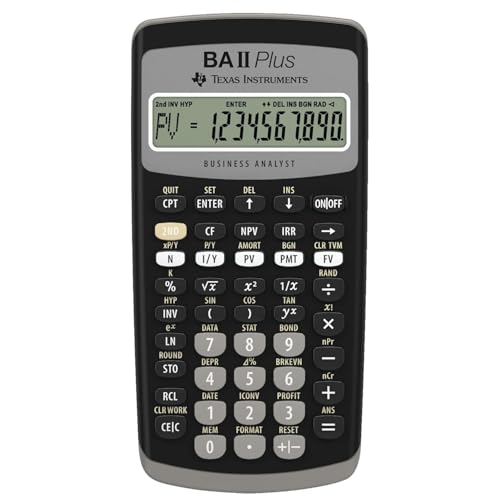
Texas Instruments BAII Plus Financial Calculator, Black
by Texas Instruments
$36.49
- Solves TVM calculations: annuities, mortgages, leases, savings
- Cash flow analysis with up to 24 uneven streams — calculates NPV and IRR
- Bond pricing, depreciation (4 methods), and amortization schedules
3. HP 12C — For RPN Users and Finance Professionals
The HP 12C has been in continuous production since 1981 — the longest-running calculator model in history. It is the gold standard on Wall Street trading desks, in commercial real estate, and in private banking. If you already use one daily, bringing it to the CFA exam is the obvious choice.
The RPN reality check: The HP 12C uses Reverse Polish Notation exclusively. Instead of typing "100 + 50 =", you type "100 ENTER 50 +". There is no equals key. This feels completely alien to most people, and the learning curve is measured in weeks, not hours. However, once RPN clicks, it is genuinely faster for multi-step calculations because you never need parentheses or worry about order of operations — the stack handles it automatically.
Should you learn RPN just for the CFA exam? Honestly, no. If you do not already know RPN, the TI BA II Plus Professional is the pragmatic choice. But if you are a finance professional who uses the HP 12C daily, or if you plan a long career in investment management where the HP 12C is the lingua franca, learning RPN now is an investment that pays dividends for decades.
Key specs for CFA:
- RPN entry (no algebraic mode)
- 20 uneven cash flows, each repeatable up to 99 times
- 120+ built-in financial functions
- Programmable keystroke sequences (up to 99 program steps)
- TVM, NPV, IRR, amortization, bond calculations
- 20 memory registers
- All-metal construction with legendary build quality
Pros:
- Industry legend — recognized and respected across finance
- 20 uneven cash flows — enough for any CFA exam question
- Programmable — automate repetitive multi-step calculations
- Premium build quality that will outlast your career
- Also approved for CFP and FRM exams
Cons:
- RPN-only — weeks of practice required if you are not already proficient
- Far fewer CFA-specific tutorials (most teach TI BA II Plus keystrokes)
- Single-line display with no prompted variable labels
- No NFV, MIRR, or Modified Duration functions (must calculate manually)
- Some multi-step calculations require more keystrokes than TI

HP 12C Financial Calculator – 120+ Functions
by HP
$34.99
- Industry standard since 1981 — trusted by finance professionals for 40+ years
- 120+ built-in functions: TVM, NPV, IRR, amortization, bond calculations
- Programmable keys for automating repetitive calculations
4. HP 12C Platinum — Premium HP Option
The HP 12C Platinum takes the legendary HP 12C and adds dual-mode entry (RPN + algebraic), a faster ARM processor, more programming memory, and a backspace/undo key. It is the "best of both worlds" for HP loyalists who sometimes want algebraic entry as a fallback.
What the Platinum adds over the standard HP 12C:
- Toggle between RPN and algebraic entry — switch modes anytime
- Faster ARM processor — noticeably quicker on complex calculations and large cash flow series
- 80 uneven cash flows (vs 20 on the standard 12C) — quadruple the capacity
- 399 program steps (vs 99 on standard) — more room for custom programs
- Undo/backspace key — fix entry errors without restarting the calculation
Key specs for CFA:
- 80 uneven cash flows (vs 20 on the standard 12C) and 130+ functions
- Dual RPN/algebraic entry mode
- Enhanced programmability (399 steps)
- TVM, NPV, IRR, amortization, bond calculations
- 20 memory registers
Pros:
- Algebraic fallback mode for those still learning RPN
- Faster processor for complex computations
- Undo key saves time on entry mistakes
- Same legendary HP build quality
- Also approved for CFP and FRM
Cons:
- Most expensive option at $74.90 — more than double the TI BA II Plus Professional
- Harder to find in stock (limited retail availability)
- Significant premium for features most CFA candidates do not need
- Still has a 1-line display
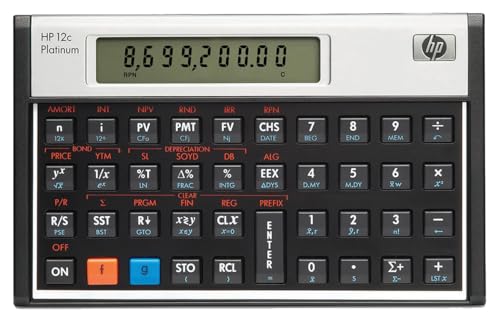
HP 12CP Financial Calculator
by HP
$74.90
- Toggle between RPN and algebraic entry modes
- 130+ built-in functions with faster ARM processor
- 80 cash flows, 399 program steps, and an undo/backspace key
TI BA II Plus vs HP 12C: The Core Decision
Since you only have two families to choose from, let us break down this decision thoroughly.
Learning Curve
TI BA II Plus: You can be exam-ready in a weekend. The algebraic entry works like any calculator you have used since grade school. The prompted display (showing N, I/Y, PV, PMT, FV labels) means you rarely make input errors. Most candidates become proficient in 5-10 hours of practice.
HP 12C: Plan for 2-4 weeks of daily practice to become comfortable with RPN. The first few days feel frustrating — your brain wants to press "=" and there is no "=" key. But around week two, something clicks and you start to see why RPN users are so passionate about it. Full proficiency takes 20-40 hours.
Keystroke Comparison: CFA-Style TVM Problem
Problem: A bond has a face value of $1,000, a coupon rate of 6% paid semiannually, and 10 years to maturity. If the required yield is 8%, what is the bond's price?
Expected answer: $864.10
TI BA II Plus Professional:
[2ND] [P/Y] 2 [ENTER] [2ND] [QUIT]     (set 2 periods/year)
20 [N]                                    (10 years x 2)
8 [I/Y]                                   (annual yield — calculator adjusts for semiannual)
30 [PMT]                                   (1000 x 0.06 / 2)
1000 [FV]
[CPT] [PV]
→ Display: -864.10
6 inputs + 1 compute = 7 key sequences
HP 12C:
[f] [FIN]                                  (clear financial registers)
20 [n]                                     (10 years x 2)
4 [i]                                      (8% / 2 = 4% per period)
30 [PMT]                                   (1000 x 0.06 / 2)
1000 [FV]
[PV]
→ Display: -864.10
6 inputs + 1 clear = 7 key sequences
Key difference: The TI BA II Plus handles the semiannual adjustment automatically when you set P/Y = 2 and enter the annual rate. The HP 12C requires you to manually divide the annual rate by the number of periods (8% / 2 = 4%) and multiply years by periods (10 x 2 = 20). This is a critical distinction — on the TI, P/Y does the work; on the HP 12C, you do the mental math.
For straightforward problems, the keystroke count is similar. But for complex multi-step calculations where you chain results, RPN starts to save keystrokes because intermediate results stay on the stack without needing to store them in memory registers.
Tutorial and Resource Availability
TI BA II Plus: Every major CFA prep provider teaches this calculator. Kaplan Schweser, Mark Meldrum, IFT, AnalystPrep, Salt Solutions, and the CFA Institute's own learning ecosystem all provide TI BA II Plus keystroke guidance. YouTube has thousands of CFA-specific TI BA II Plus tutorials. If you get stuck on a calculation, you will find the answer within minutes.
HP 12C: Resources exist but are much sparser. You will find some HP 12C CFA tutorials on YouTube and in HP's own documentation, but most CFA prep content assumes you are using a TI. Some candidates who use the HP 12C end up "translating" TI keystrokes into HP equivalents — an extra cognitive burden you do not need during exam prep.
The Verdict on TI vs HP
| Factor | TI BA II Plus Pro | HP 12C |
|---|---|---|
| Learning curve | Days | Weeks |
| Tutorial availability | Abundant | Limited |
| Price | ~$36 | Varies by seller |
| Chained calculations | More keystrokes | Fewer keystrokes (RPN) |
| Error risk | Lower (prompted display) | Higher (no labels) |
| Career prestige | Functional | Iconic |
| Candidate usage | ~90% | ~10% |
If you are starting fresh: TI BA II Plus Professional. No contest.
If you already know RPN: HP 12C. Do not abandon years of muscle memory.
How to Reset Your Calculator After Memory Clear
CFA exam proctors clear your calculator memory before the exam. You need to reconfigure your settings immediately. Here is how to do it on each approved model:
TI BA II Plus / Professional
- Press 2ND then FORMAT then set decimal places to 4 then press ENTER then 2ND then QUIT
- Press 2ND then P/Y then enter 1 then press ENTER then press the down arrow then enter 1 then press ENTER then 2ND then QUIT
- Press 2ND then BGN — if it shows "BGN", press 2ND then SET to switch to "END" then 2ND then QUIT
Translation: 4 decimal places, 1 payment per year, 1 compounding period per year, END mode. Total time with practice: ~15 seconds.
Why P/Y = 1 matters for CFA: Many CFA candidates set P/Y to 1 and handle all period adjustments manually (dividing annual rates, multiplying years by periods). This avoids confusion when switching between annual, semiannual, quarterly, and monthly compounding within the same exam section. The CFA curriculum assumes manual adjustment, and most prep providers teach this approach.
HP 12C / Platinum
- Press f then CLEAR REG to clear all storage and financial registers (in Program mode, use f then CLEAR PRGM to clear stored programs)
- Press f then 4 to set 4 decimal places
- The HP 12C has no payments-per-year setting — you always enter the periodic rate (annual rate / periods per year) and the total number of periods yourself
- Verify END mode — if "BEGIN" appears in the display, press g then END (the 8 key) to switch it off
Total time with practice: ~10 seconds.
Critical: Practice this reset process at least 10 times before exam day. On the real exam, you want it to be pure muscle memory so you waste zero mental energy on setup and jump straight into the first question.
Calculator Strategy by CFA Level
Each CFA level has different quantitative demands. Here is how your calculator usage shifts:
CFA Level I — Heavy Calculator Usage
Level I is 180 multiple-choice questions in 4.5 hours (two 2.25-hour sessions). The quantitative methods, fixed income, equity valuation, and corporate finance sections are calculator-intensive. You will use TVM, NPV, IRR, bond pricing, and statistical functions heavily.
Calculator tip for Level I: Speed matters. With 180 questions in 270 minutes, you have 90 seconds per question. Practice until every common calculation (TVM, bond price, NPV) takes under 15 seconds on your calculator. The time savings compound over 180 questions.
CFA Level II — Complex Multi-Step Calculations
Level II is 88 vignette-based questions in 4.5 hours. Questions are more complex, often requiring multiple calculator steps chained together. Free cash flow models, multi-stage DDM, interest rate swap valuation, and option pricing all appear.
Calculator tip for Level II: Memory registers become valuable here. Store intermediate results (like a calculated WACC) in a memory register so you can recall them for subsequent calculations in the same vignette. On the TI BA II Plus, use STO + 0-9 to store and RCL + 0-9 to recall.
CFA Level III — Fewer Calculations, Higher Stakes
Level III mixes constructed response (essay-style) with vignettes in 4.5 hours. While there are fewer pure calculation questions, the ones that appear are high-weight and often involve portfolio-level math (risk budgeting, asset allocation, performance attribution).
Calculator tip for Level III: Time management is paramount. You cannot afford to fumble with your calculator on the few quantitative questions that appear. Since most of your time is spent reading and writing, every second saved on calculations is a second available for constructing your written responses.
CFA vs CFP Calculator Overlap
Many finance professionals pursue both the CFA and CFP designations. If this applies to you, your calculator choice has cross-exam implications:
| Calculator | CFA-Approved | CFP-Approved | Both? |
|---|---|---|---|
| TI BA II Plus | Yes | Yes | Yes |
| TI BA II Plus Professional | Yes | Yes | Yes |
| HP 12C | Yes | Yes | Yes |
| HP 12C Platinum | Yes | Yes | Yes |
| HP 10bII+ | No | Yes | No |
| HP 17bII+ | No | Yes | No |
| Sharp EL-738 | No | Yes (discontinued) | No |
The takeaway: All four CFA-approved models are also CFP-approved. If you start with the CFA and later pursue the CFP, your calculator carries over. But if you start with the CFP using an HP 10bII+ or HP 17bII+, you will need to switch calculators for the CFA — and learning a new calculator mid-career is disruptive.
Our advice: If there is any chance you will pursue the CFA, start with a CFA-approved calculator from day one. The TI BA II Plus Professional covers CFA, CFP, FRM, and CMA — maximum flexibility for $36.49.
Which Calculator Should You Choose?
Use this decision framework:
Are you new to financial calculators and starting CFA Level I prep? Get the TI BA II Plus Professional ($36.49). It is the standard for a reason — easiest to learn, every prep provider teaches it, and the Professional features come free.
Do you already use an HP 12C at work or from a previous exam? Stick with the HP 12C. Muscle memory is your most valuable asset on exam day. Do not abandon it.
Do you want the ultimate flexibility? Get the HP 12C Platinum ($74.90). You get RPN speed when you want it and algebraic entry when you need it, plus the undo key.
Are you on a strict budget? The standard TI BA II Plus and the HP 12C are the lowest-priced approved options, typically in the same ballpark (street prices fluctuate by seller). Do not pick on price alone — the gap is small. Choose based on which entry mode (algebraic vs RPN) suits you and which one your prep provider teaches.
Our overall recommendation: The TI BA II Plus Professional at $36.49 is the best choice for the vast majority of CFA candidates. It is the de facto standard, every resource teaches it, and the Professional features come at no additional cost. Unless you have a specific reason to choose the HP 12C, the TI BA II Plus Professional is the answer.
Exam Day Calculator Checklist
Use this checklist the night before and morning of your CFA exam:
- Primary calculator — confirm it is a CFA-approved model (TI BA II Plus/Pro or HP 12C/Platinum)
- Fresh batteries installed — do not risk a dead calculator mid-exam
- Backup calculator — same model strongly recommended, also with fresh batteries
- Extra batteries — keep them accessible (not in sealed packaging some proctors prohibit at the desk)
- Practice your reset sequence — do one final memory-clear-and-reconfigure at home to confirm muscle memory
- Verify settings after reset — P/Y = 1, C/Y = 1, END mode, 4 decimal places
- Cover any formulas on the calculator back — use tape or a sticker over printed formulas
- Clean the screen and keys — a smudged display costs you time and causes errors
- Test every key — press each function key to make sure nothing is stuck or unresponsive
- Remove any non-standard stickers or labels — keep it clean for proctor inspection
Common Calculator Mistakes on the CFA Exam
Even experienced candidates make these errors. Watch out for:
1. Forgetting to reset P/Y after memory clear. The default P/Y on the TI BA II Plus is 12 (monthly). If you forget to change it to 1, every TVM calculation will be wrong. This is the single most common calculator error on the CFA exam.
2. Sign convention errors. Financial calculators use sign conventions — cash inflows are positive, outflows are negative. If you enter PV as positive when it should be negative (or vice versa), your answer will have the wrong sign or be completely incorrect. When in doubt: money you pay out is negative, money you receive is positive.
3. Not clearing the TVM registers between problems. Old values lurking in N, I/Y, PV, PMT, or FV from a previous calculation will corrupt your next answer. On the TI BA II Plus, press 2ND then CLR TVM before starting each new TVM problem. On the HP 12C, press f then FIN.
4. Confusing annual vs periodic rates on the HP 12C. The HP 12C requires you to enter the periodic rate (annual rate / periods per year), not the annual rate. The TI BA II Plus can handle this automatically via P/Y. If you use the HP 12C, always mentally divide the annual rate before entering it.
5. Leaving the calculator in BGN (begin) mode. Begin mode shifts all payments to the beginning of each period, which changes every TVM answer. Most CFA problems assume end-of-period payments. Always verify END mode after a memory clear.
Free CFA Exam Prep Resources
A great calculator is only part of the equation. Pair it with solid study materials:
- Free CFA Level I Study Guide — Complete topic coverage across all CFA Level I curriculum areas
- Free CFA Level I Practice Questions — Unlimited attempts with detailed answer explanations
- AI Tutor — 10 free questions per day — ask it to walk you through calculator keystrokes for any CFA problem
- CFA Level II Study Guide — Advanced topics for Level II preparation
- CFA Level III Study Guide — Portfolio management and Level III essentials
The AI tutor is particularly useful for calculator practice. Ask it questions like "Walk me through how to calculate Modified Duration on the TI BA II Plus Professional" or "How do I solve a 3-stage DDM on the HP 12C?" and it will provide step-by-step keystroke instructions tailored to your calculator.
Final Verdict
The CFA exam gives you the simplest calculator decision in professional finance: TI BA II Plus or HP 12C. That is it.
For roughly 90% of candidates, the TI BA II Plus Professional ($36.49) is the right answer. Same price as the standard with more features, universal tutorial support, prompted display for error-free input, and cross-exam compatibility with CFP, FRM, and CMA.
For the ~10% who already know and love RPN, the HP 12C is the right answer. Do not switch away from it — RPN proficiency is a career asset in finance.
The HP 12C Platinum ($74.90) is a nice-to-have if you want the flexibility of dual entry modes, but at more than double the price of the TI BA II Plus Professional, it is hard to justify for most candidates.
Whichever calculator you choose, the most important thing is to start using it immediately and exclusively. Every practice problem, every mock exam, every study session — use your CFA calculator. By exam day, the keystrokes should be as automatic as typing on a keyboard. You should not be thinking about your calculator during the exam; you should be thinking about the finance.
Start your CFA exam preparation today with our free CFA Level I study guide and practice questions.
As an Amazon Associate, OpenExamPrep earns from qualifying purchases. All recommendations are based on editorial review.

 Free CE
 Take courses on Udemy
 CFA Level I on Princeton Review
