 View
ViewWhy Your Calculator Choice Matters for the Real Estate Exam
The real estate licensing exam is not just vocabulary and law — a significant portion of the test is pure math. Depending on your state, 10-15% of questions involve calculations: commission splits, property tax proration, loan-to-value ratios, mortgage payments, capitalization rates, and gross rent multipliers. Getting these questions right is often the difference between passing and failing.
Unlike professional finance exams (CFA, CFP) that mandate specific calculator models, the real estate exam has a simpler rule: most states allow any non-programmable, silent, handheld, battery-operated calculator without an alphabetic keypad. That gives you a wide range of options — from a $7 basic desk calculator to a $35 financial calculator that will serve you throughout your real estate career.
But here is the catch: not every state allows you to bring your own calculator. A handful of states -- including Arkansas, Colorado, Idaho, Massachusetts, and Wyoming -- ban personal calculators and make you use the on-screen calculator built into the exam software instead. And even in states that do allow a personal calculator, the rules are strict: bring the wrong type and the proctor will confiscate it before you sit down.
This guide covers everything you need to know: which states allow calculators (and which do not), the 5 best calculators for the real estate exam in 2026, keystroke examples for common exam math, and free resources to practice.
State-by-State Calculator Policy Overview
The real estate licensing exam is administered state by state, and each state sets its own calculator policy. Most states contract with one of two major testing providers — Pearson VUE or PSI — and the calculator rules are generally consistent within each provider. Here is how the landscape breaks down in 2026:
States That ALLOW Calculators (Majority)
Most states permit a calculator on the real estate exam as long as it meets these criteria:
- Silent — no audible keypress tones or alarms
- Handheld — must be small enough to hold in one hand
- Battery-operated — solar-only calculators are usually fine too
- Non-programmable — cannot store text, formulas, or programs
- Non-printing — no paper tape or receipt roll
- No alphabetic keypad — no QWERTY keyboard, no letter keys beyond standard function labels
This covers standard desk calculators, basic scientific calculators (like the TI-30XIIS), and most financial calculators (like the HP 10bII+ and HP 12C). Graphing calculators are almost always prohibited because they can store text and programs.
States using Pearson VUE or PSI typically follow this standard policy. This includes major markets like Texas, Florida, New York, Illinois, Pennsylvania, Ohio, Georgia, North Carolina, Michigan, Arizona, Virginia, New Jersey, Washington, Oregon, Nevada, and many more. Texas goes a step further and explicitly accepts a financial calculator commonly used in real estate, finance, or accounting, as long as it is silent and non-printing.
Always verify: Contact your state real estate commission or check your exam registration confirmation for the exact calculator policy. Rules change, and a few states (see below) provide an on-screen calculator instead of letting you bring one.
States That Provide an On-Screen Calculator Instead
Several states do not let you bring your own calculator -- they hand you an on-screen calculator inside the exam software instead. Confirmed no-personal-calculator states include:
Arkansas — The Arkansas Real Estate Commission (Pearson VUE) does not permit personal calculators in the testing room. Candidates use the on-screen calculator provided by the testing software.
Colorado — Colorado does not permit personal calculators; an on-screen calculator with the basic functions you need for valuation and math questions is provided.
Idaho — Personal calculators are not allowed; an on-screen calculator is available in the exam software.
Massachusetts — Personal calculators are not permitted in the exam room. PSI provides an on-screen calculator and scratch paper.
Wyoming — The Wyoming Real Estate Commission does not allow personal calculators; the testing administrator provides materials for making calculations.
A note on California: Despite outdated claims that California bans calculators, the California Department of Real Estate (DRE) officially permits a silent, battery-operated, pocket-sized, non-programmable calculator that has no printing capability and no alphabetic keyboard. The exam software also includes an on-screen calculator. Bring a compliant calculator, but be ready to fall back to the on-screen tool if a particular center directs you to.
If your state provides the calculator: Do not panic. The math problems on these exams are solvable with a basic on-screen calculator. Practice with an online basic calculator before exam day so clicking buttons feels natural, and focus your study time on mastering the formulas. State lists change -- always confirm your state's current rule on your exam confirmation.
On-Screen Calculators at Testing Centers
Even in states that allow personal calculators, most testing centers (Pearson VUE and PSI) provide a basic on-screen calculator within the exam software. This on-screen calculator typically offers:
- Basic arithmetic: addition, subtraction, multiplication, division
- Percentage function
- Memory store/recall
- Square root
It does not include financial functions (TVM, amortization, NPV). For most real estate exam questions, this on-screen calculator is sufficient — but clicking buttons on screen is significantly slower than pressing physical keys. If your state allows a personal calculator, bring one.
The 6 Types of Math on the Real Estate Exam
Before choosing a calculator, understand what you will be calculating. These six problem types appear on virtually every state real estate exam:
1. Commission Calculations
The most common math question. You need to calculate total commission, then split it between listing broker, selling broker, listing agent, and selling agent.
Example: A property sells for $350,000 with a 6% total commission. The listing broker and selling broker split 50/50. The listing agent gets 60% of their broker's share. What does the listing agent earn?
$350,000 x 0.06 = $21,000 (total commission) $21,000 x 0.50 = $10,500 (listing broker's share) $10,500 x 0.60 = $6,300 (listing agent's earnings)
Calculator needed: Basic — just multiplication.
2. Property Tax Proration
At closing, property taxes are divided between buyer and seller based on the number of days each party owns the property during the tax period.
Example: Annual property tax is $4,380. Closing is on September 15. Using a 365-day year, how much does the seller owe?
Seller owns Jan 1 through Sep 14 = 257 days $4,380 / 365 = $12.00 per day 257 x $12.00 = $3,084.00
Calculator needed: Basic — division and multiplication.
3. Loan-to-Value (LTV) Ratio
LTV determines how much a lender will finance relative to the property value. You also use it to calculate down payment requirements.
Example: A buyer wants to purchase a $280,000 home with an 80% LTV loan. What is the required down payment?
$280,000 x 0.80 = $224,000 (loan amount) $280,000 - $224,000 = $56,000 (down payment)
Calculator needed: Basic — multiplication and subtraction.
4. Monthly Mortgage Payment (PITI)
Some exams ask you to calculate the monthly principal and interest payment. This is where a financial calculator shines — the formula involves exponents that are tedious on a basic calculator.
Example: What is the monthly payment on a $240,000 loan at 6.5% interest for 30 years?
Using the mortgage payment formula: M = P[r(1+r)^n] / [(1+r)^n - 1] Where r = 0.065/12 = 0.005417, n = 360
This requires a financial calculator or multiple tedious steps on a basic one. The answer is $1,516.96.
Calculator needed: Financial calculator makes this trivial. On a basic calculator, you would need to compute (1.005417)^360 manually — painful but possible if the exam provides factor tables.
5. Capitalization Rate
Used to value income-producing properties. Cap rate = Net Operating Income / Property Value.
Example: A property generates $36,000 in annual net operating income. Comparable properties sell at an 8% cap rate. What is the estimated property value?
$36,000 / 0.08 = $450,000
Calculator needed: Basic — just division.
6. Gross Rent Multiplier (GRM)
Another property valuation method. GRM = Sale Price / Gross Annual Rent.
Example: A comparable property sold for $300,000 with $2,500/month gross rent ($30,000/year). What is the GRM? If a subject property rents for $2,800/month, what is its estimated value?
GRM = $300,000 / $30,000 = 10 Subject value = $2,800 x 12 x 10 = $336,000
Calculator needed: Basic — multiplication and division.
The bottom line: Five of the six common problem types require only basic arithmetic. A simple $7 calculator handles them all. Only mortgage payment calculations (type 4) truly benefit from a financial calculator — and many state exams either avoid this problem type or provide amortization factor tables.
Our Top 5 Real Estate Exam Calculators for 2026
1. Texas Instruments TI-30XIIS — Best Overall for the Real Estate Exam
The TI-30XIIS is the ideal balance of capability and simplicity for the real estate licensing exam. Its 2-line display shows both your input and the result simultaneously — invaluable when you are working through multi-step commission or proration problems and need to verify you entered the right numbers.
Why real estate candidates love it: The TI-30XIIS is a scientific calculator, not a financial calculator, which means it does not have TVM keys. But for the real estate exam, that is actually an advantage — there are no extra buttons to confuse you or raise red flags with proctors. It handles percentages, fractions, exponents, and all basic arithmetic with ease, and the 2-line display prevents the single biggest exam math mistake: re-entering a number you already calculated.
Key specs for the real estate exam:
- 2-line display (input + result) — verify before you calculate
- Percentage key for commission and proration problems
- Parentheses for order-of-operations — no mental gymnastics
- Solar + battery powered — zero chance of dying mid-exam
- Lightweight and compact — fits easily on the testing desk
Why it complies with every state policy: The TI-30XIIS is non-programmable, silent, battery-operated, and has no alphabetic keypad. It is explicitly permitted by Pearson VUE and PSI testing centers. No proctor will question it.
Pros:
- 2-line display prevents input errors
- Handles every real estate exam math problem
- Solar + battery — never dies
- Under $18 — excellent value
- Universally accepted at all testing centers
- Lightweight and portable
Cons:
- No financial (TVM) functions — mortgage payment calculations require manual formula entry
- More features than strictly necessary for basic real estate math
- Scientific functions you will never use on this exam

Texas Instruments TI-30XIIS Scientific Calculator, White
by Texas Instruments
$17.99
- 2-line display shows entry and result simultaneously
- One and two variable statistics with three regression options
- Solar + battery powered for reliable exam day performance
2. HP 10bII+ Financial Calculator — Best Financial Calculator for Real Estate
If you want a calculator that handles the exam and becomes your daily work tool after you get your license, the HP 10bII+ is the smartest investment. For $32.95, you get a professional-grade financial calculator with TVM, amortization, and NPV functions built in — everything you need for real estate practice.
Why it is worth the upgrade for real estate: On the exam, the HP 10bII+ solves mortgage payment problems in 5 keystrokes instead of 15+ on a basic calculator. But the real payoff comes after you pass: when a client asks "What would my monthly payment be on this house?" you can answer in 10 seconds. When you are evaluating investment properties, the built-in NPV and IRR functions let you run serious financial analysis on the spot.
Key specs for the real estate exam:
- TVM keys (N, I/YR, PV, PMT, FV) — solve mortgage payments instantly
- Amortization function — show clients their principal vs interest breakdown
- Over 100 built-in financial functions
- 12-digit display with adjustable contrast
- Algebraic entry (standard calculator logic)
How it complies with state policies: Despite being a financial calculator, the HP 10bII+ is non-programmable (you cannot write or store custom programs), silent, battery-operated, and has no alphabetic keypad. It meets every standard state requirement. However, some proctors may not be familiar with financial calculators — bring your exam confirmation showing the calculator policy just in case.
Pros:
- Solves mortgage payment and TVM problems instantly
- Transitions directly to your real estate career
- Clean, intuitive keyboard layout
- Non-programmable — passes all state calculator policies
- Amortization tables for client presentations
- Affordable at $32.95
Cons:
- Overkill for the exam itself (a basic calculator suffices)
- Some proctors may scrutinize financial calculators more closely
- No 2-line display (single line only)
- Takes longer to learn than a basic calculator

HP 2716570 10bII+ Financial Calculator, 12-Digit LCD
by HP
$32.95
- Over 100 built-in functions including probability distributions
- Intuitive keyboard layout with minimal keystrokes required
- Easy-to-read display with adjustable contrast and on-screen labels
3. Empire 12-Digit Desk Calculator — Best Budget Option
If you just want a no-nonsense calculator that does math and nothing else, the Empire 12-Digit Desk Calculator is the best budget option at $8.99. The 30-degree angled display is easier to read than flat-screen models, and the large keys reduce input errors when you are working quickly under exam pressure.
Why budget-conscious candidates choose it: Real estate exam math is fundamentally basic arithmetic — multiplication, division, percentages. You do not need scientific functions, 2-line displays, or financial features to pass. This calculator does the essentials perfectly, costs less than a lunch, and meets every state calculator requirement.
Key specs for the real estate exam:
- 12-digit display — handles large property values without overflow
- 30-degree angled screen — easy to read at testing desk angle
- Solar + battery dual power
- Large keys for fast, accurate entry
- Percentage key for commission and proration
- Lightweight at 5.3 ounces
Pros:
- Under $9 — cheapest option that works well
- 12-digit display handles any property value
- Angled screen is easier to read than flat displays
- Large keys reduce input errors
- Solar + battery — reliable power
- Zero learning curve
Cons:
- No memory functions beyond basic M+/M-
- No 2-line display — cannot verify input before calculating
- No scientific or financial functions
- Feels less premium than TI or HP models
- Desk-style form factor is slightly bulkier than pocket calculators
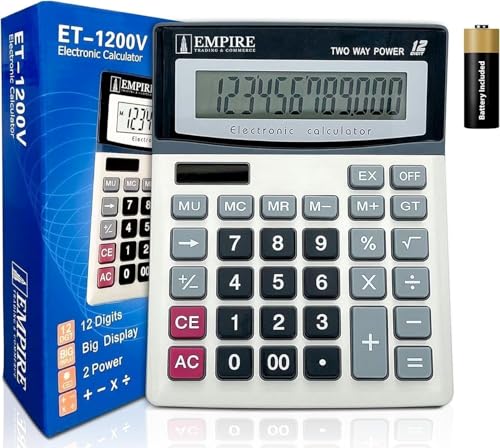
Empire Desk Calculator with Large Key Buttons, 12-Digit Large Eye-Angled Display
by Empire Trading
$8.99
- 12-digit display with 30° angled screen for easy viewing
- Solar + battery dual power for reliable operation
- Large keys designed for quick, comfortable data entry
4. Amazon Basics LCD Desktop Calculator — Best Ultra-Budget Option
At $7.19, the Amazon Basics calculator is the most affordable option on this list. It handles every basic real estate exam math problem — commission splits, proration, LTV, cap rate, GRM — and meets every state calculator policy requirement. If you just need a calculator that works and costs almost nothing, this is it.
Why it works for the real estate exam: The 8-digit display is sufficient for every exam problem (the largest numbers you will encounter are property values in the low millions — well within 8 digits). It includes percentage and square root functions, both of which appear on the exam. The compact size makes it easy to carry and unobtrusive on the testing desk.
Key specs for the real estate exam:
- 8-digit LCD display
- Basic arithmetic + percentage + square root
- Battery powered (LR1130 button cell)
- Compact and lightweight
- Simple on/off operation
Pros:
- Cheapest option at $7.19
- Amazon Basics reliability and return policy
- Compact — fits in a pocket
- Does everything the real estate exam requires
- Zero learning curve
Cons:
- 8-digit display (not 12) — tight for very large calculations
- No solar backup — battery only
- No memory functions
- Small keys may cause more input errors
- Feels disposable — not a long-term career tool
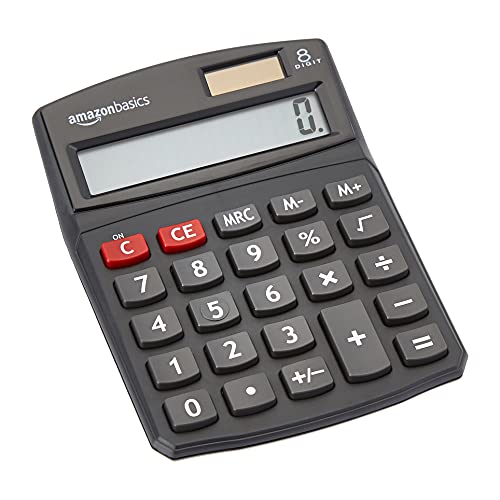
Amazon Basics LCD 8-Digit Desktop Calculator, Portable and Easy to Use, Black
by Amazon Basics
$7.19
- 8-digit LCD display with sharp, bright output
- Basic functions: addition, subtraction, multiplication, division, percentage, square root
- Compact and portable — easy to carry to the testing center
5. HP 12C Financial Calculator — Best for Your Real Estate Career
The HP 12C is not the best choice for the exam — it is the best choice for your career. Since 1981, the HP 12C has been the industry-standard financial calculator in real estate, banking, and finance. Real estate investors, commercial brokers, and mortgage professionals use it every day. If you plan to do more than residential sales — if you want to analyze investment properties, calculate IRR on rental portfolios, or work in commercial real estate — the HP 12C is the tool professionals use.
Why career-focused agents choose it: The HP 12C can do things no basic calculator can. Amortization schedules, NPV and IRR for investment analysis, bond calculations, and programmable keystroke sequences for repetitive calculations. When you sit across from an investor client and pull out an HP 12C, you signal that you are a serious professional who speaks their language.
Key specs for real estate professionals:
- 120+ built-in financial functions
- TVM, NPV, IRR, amortization
- Programmable keystroke sequences (203 program lines)
- 80 uneven cash flow entries
- 20 memory registers
- RPN (Reverse Polish Notation) entry — fast once learned
- Legendary durability — all-metal construction
An exam-day warning: The HP 12C is technically a programmable calculator. Most testing centers allow it because it has no alphabetic keyboard and is not an alpha-programmable model, but some PSI proctors have denied it or asked candidates to clear its memory before the exam. If you bring an HP 12C, clear its program memory beforehand, bring your exam confirmation showing the calculator policy, and carry a cheap non-programmable backup just in case.
The RPN consideration: The HP 12C uses Reverse Polish Notation, where you enter numbers first and then the operation (e.g., "100 ENTER 50 +" instead of "100 + 50 ="). RPN eliminates parentheses and is faster for chained calculations, but it has a learning curve. If you have never used RPN, do not buy this calculator the week before your exam. Allow at least 2-3 weeks of daily practice.
Pros:
- Industry standard — respected by clients and colleagues
- 120+ functions cover every real estate calculation
- Programmable for repetitive calculations
- Built to last decades — all-metal construction
- Also approved for CFA, CFP, and FRM exams
- Strong resale value
Cons:
- Programmable -- some PSI proctors deny it or require you to clear its memory before the exam
- RPN-only — steep learning curve if new to HP calculators
- Overkill for the real estate licensing exam
- $34.99 is more than you need to spend just for the exam
- Single-line display — no input verification
- Most real estate exam prep courses do not teach HP 12C keystrokes

HP 12C Financial Calculator – 120+ Functions
by HP
$34.99
- Industry standard since 1981 — trusted by real estate professionals for 40+ years
- 120+ built-in functions: TVM, NPV, IRR, amortization, bond calculations
- Programmable keys for automating repetitive calculations
Which Calculator Should You Choose?
Use this decision framework based on your situation:
Just need to pass the exam at the lowest cost?
Get the Amazon Basics Calculator ($7.19) or the Empire 12-Digit ($8.99). Both handle every exam math problem and cost less than a coffee.
Want the best exam experience?
Get the TI-30XIIS ($17.99). The 2-line display prevents input errors, solar + battery power means it never dies, and it is universally accepted at every testing center. This is our top recommendation for most candidates.
Planning a career in real estate (not just passing the exam)?
Get the HP 10bII+ ($32.95). It handles the exam AND becomes your daily work calculator. Mortgage payments, amortization, investment analysis — all in 5 keystrokes.
Going into commercial real estate or investment analysis?
Get the HP 12C ($34.99). It is the professional standard and signals competence to investor clients. But give yourself 2-3 weeks to learn RPN before exam day.
Taking the exam in a no-personal-calculator state (Arkansas, Colorado, Idaho, Massachusetts, or Wyoming)?
You cannot bring your own calculator. Focus your study time on memorizing the key formulas and practicing with a basic on-screen calculator so the click-to-enter workflow feels natural on exam day.
| Calculator | Price | Best For | Display | Financial Functions | Career Use |
|---|---|---|---|---|---|
| TI-30XIIS | $17.99 | Most candidates | 2-line | No | Limited |
| HP 10bII+ | $32.95 | Career agents | 1-line, 12-digit | Yes (TVM, amortization) | Excellent |
| Empire 12-Digit | $8.99 | Budget | 1-line, 12-digit | No | No |
| Amazon Basics | $7.19 | Ultra-budget | 1-line, 8-digit | No | No |
| HP 12C | $34.99 | Professionals | 1-line, 10-digit | Yes (120+ functions) | Industry standard |
Basic Calculator vs Financial Calculator: What is the Difference?
Many real estate exam candidates wonder whether they need a financial calculator. Here is the honest answer: for the exam, no. For your career, yes.
What a Basic Calculator Does
A basic calculator (TI-30XIIS, Empire, Amazon Basics) handles arithmetic: addition, subtraction, multiplication, division, percentages, and square roots. This covers 90% of real estate exam math — commission splits, proration, LTV, cap rate, and GRM are all basic arithmetic.
What a Financial Calculator Adds
A financial calculator (HP 10bII+, HP 12C) adds time value of money (TVM) functions. TVM is the concept that money today is worth more than the same amount in the future because of its earning potential. Financial calculators have 5 dedicated keys:
- N — Number of periods (e.g., 360 months for a 30-year mortgage)
- I/YR (or i) — Interest rate per period
- PV — Present value (loan amount, current investment value)
- PMT — Payment per period (monthly mortgage payment)
- FV — Future value (balloon payment, investment growth)
Enter any 4 of these 5 variables and the calculator solves for the 5th. This is transformative for mortgage and investment calculations.
The Career Argument
After you pass the exam and start working, clients will ask: "What would my monthly payment be on a $400,000 house at 7%?" With a basic calculator, you are pulling up a mortgage calculator app. With an HP 10bII+, you answer in 10 seconds — and you look like a professional who knows their numbers.
If you plan to do any of the following, invest in a financial calculator now:
- Calculate monthly payments for clients at open houses
- Analyze investment property cash flows
- Compare different mortgage scenarios (15-year vs 30-year, fixed vs ARM)
- Calculate amortization schedules
- Evaluate capitalization rates and cash-on-cash returns
Keystroke Examples: Same Problem, Two Calculators
Problem: Monthly Mortgage Payment
What is the monthly payment on a $240,000 loan at 6.5% annual interest for 30 years?
Expected answer: $1,516.96
On the TI-30XIIS (Basic Scientific Calculator)
The mortgage payment formula is: M = P x [r(1+r)^n] / [(1+r)^n - 1]
Where P = $240,000, r = 0.065/12 = 0.005417, n = 360
Step 1: Calculate (1 + r)^n
1.005417 [x^y] 360 [=]
→ Display: 6.9918 (approximately)

Step 2: Calculate numerator: r x (1+r)^n
0.005417 [x] 6.9918 [=]
→ Display: 0.037872

Step 3: Calculate denominator: (1+r)^n - 1
6.9918 [-] 1 [=]
→ Display: 5.9918

Step 4: Divide numerator by denominator
0.037872 [÷] 5.9918 [=]
→ Display: 0.006321

Step 5: Multiply by loan amount
0.006321 [x] 240000 [=]
→ Display: 1,516.96
That is 5 steps and about 50 keystrokes. Doable, but slow and error-prone under exam pressure.
On the HP 10bII+ (Financial Calculator)
360 [N]  6.5 [I/YR]  240000 [PV]  0 [FV]  [PMT]
→ Display: -1,516.96
That is 5 keystrokes and 10 seconds. The negative sign indicates cash flowing out (a payment). The HP 10bII+ handles the entire formula internally.
On the HP 12C (RPN Financial Calculator)
360 [n]  6.5 [ENTER] 12 [÷] [i]  240000 [PV]  0 [FV]  [PMT]
→ Display: -1,516.96
Note: The HP 12C requires you to divide the annual rate by 12 to get the monthly rate, while the HP 10bII+ does this automatically when P/YR is set to 12. A small extra step, but HP 12C users prefer the explicitness.
Problem: Commission Split
A property sells for $425,000 at 5.5% total commission. The listing broker gets 55%, and the selling agent gets 70% of the selling broker's share. What does the selling agent earn?
Expected answer: $7,363.13
On Any Calculator (All 5 Work the Same)
425000 [x] 0.055 [=]          → $23,375.00 (total commission)
23375 [x] 0.45 [=]            → $10,518.75 (selling broker's share: 100% - 55%)
10518.75 [x] 0.70 [=]         → $7,363.13  (selling agent's earnings)
Commission problems are pure multiplication — every calculator on this list handles them equally well. This is why a $7 calculator is perfectly adequate for the exam.
Tips for On-Screen-Calculator States (Arkansas, Colorado, Idaho, Massachusetts, Wyoming)
If you are taking the real estate exam in a state that does not let you bring a personal calculator, here are strategies to succeed with the on-screen tool:
1. Memorize the Core Formulas
Write these on your scratch paper (provided at the testing center) as soon as the exam begins:
- Commission: Sale Price x Commission Rate = Total Commission
- Proration: Annual Amount / 365 (or 360) x Number of Days = Prorated Amount
- LTV: Loan Amount / Property Value = LTV Ratio
- Cap Rate: NOI / Property Value = Cap Rate (or NOI / Cap Rate = Value)
- GRM: Sale Price / Gross Annual Rent = GRM (or GRM x Gross Annual Rent = Value)
2. Practice Mental Math Shortcuts
- Multiplying by 6%: Move the decimal left 2 places, multiply by 6. Example: $350,000 x 0.06 → $3,500 x 6 = $21,000
- Dividing by 365: Divide by 365 once, then multiply the daily rate by the number of days. For 365-day problems, remember that $365/year = $1/day — look for numbers near multiples of 365.
- Percentage splits: 60/40 is just x0.6 and x0.4. 55/45 is x0.55 and x0.45.
3. Use the On-Screen Calculator Efficiently
Practice with a basic on-screen calculator (search "online calculator" in your browser) before exam day. Get comfortable clicking rather than pressing physical keys. Key tips:
- Use the memory function (M+, MR) to store intermediate results
- Double-check every entry before pressing equals — there is no 2-line display
- Take your time — accuracy matters more than speed
4. Look for Round Numbers
Exam writers in no-calculator states design problems with manageable numbers. A commission problem will use $300,000 at 6%, not $347,250 at 5.75%. Trust that the math will work out to clean numbers.
Exam Day Calculator Checklist
Use this checklist the night before and morning of your real estate exam (for states that allow calculators):
- Calculator is charged / has fresh batteries — do not risk a dead calculator mid-exam
- Verify it is non-programmable — no text storage, no formula storage, no custom programs
- No alphabetic keypad — no QWERTY keys, no letter entry beyond function labels
- It is silent — turn off any keypress tones or alarms
- Bring a backup — a second cheap calculator costs $7 and provides peace of mind
- Print your exam confirmation — showing the calculator policy, in case a proctor questions your model
- Practice one full set of problems — commission, proration, LTV, cap rate, GRM with your exam calculator
- Clean the screen and keys — a smudged display wastes time squinting at numbers
- Remove any stickers or labels — proctors may inspect your calculator before the exam
Do Not Overbuy: A $7 Calculator Passes the Exam
Let us be honest: the real estate licensing exam is not the CFA or CFP. You do not need a $35 financial calculator to pass. The math on the real estate exam is designed to be straightforward — commission splits, proration, simple ratios, and basic arithmetic. A $7 Amazon Basics calculator handles every single problem.
The only reason to spend more is if you want your exam calculator to also be your career calculator. If so, the HP 10bII+ ($32.95) or HP 12C ($34.99) are smart investments that pay for themselves the first time a client asks about mortgage payments. But if your goal is simply to pass the exam at the lowest cost, do not let anyone tell you that you need an expensive calculator.
Free Real Estate Exam Prep Resources
A calculator is just a tool — you still need to know the formulas and concepts. Here are free resources to prepare:
- Free Real Estate Exam Study Guide — Comprehensive content covering national and state-specific topics
- Free Real Estate Practice Questions — Unlimited attempts with detailed explanations for every answer
- AI Study Tutor — 10 free questions per day — ask it to walk you through any real estate math problem step by step
- State-Specific Prep — Check if your state has a dedicated exam page (e.g., CA, NY, TX, FL) with state-specific content and practice questions
The AI tutor is particularly useful for calculator practice. Ask it questions like "Walk me through how to calculate property tax proration for a September 15 closing" or "How do I solve a commission split problem where the listing agent gets 60% of the listing broker's 55% share?" and it will give you step-by-step instructions with your specific calculator.
Final Verdict
For most real estate exam candidates, the TI-30XIIS ($17.99) is the best choice. Its 2-line display prevents the input errors that cost points on exam day, it handles every math problem you will encounter, it meets every state calculator policy, and it costs less than $20. If you want to invest in your career at the same time, the HP 10bII+ ($32.95) gives you professional-grade financial functions that will serve you daily as a working real estate agent.
If budget is the priority, the Amazon Basics ($7.19) or Empire 12-Digit ($8.99) calculators work perfectly for the exam. And if you are headed into commercial real estate or investment analysis, the HP 12C ($34.99) is the industry standard that signals professionalism to clients and colleagues.
If you are in a state that provides an on-screen calculator instead of letting you bring one (Arkansas, Colorado, Idaho, Massachusetts, or Wyoming), skip the purchase and invest that time in memorizing formulas and practicing with a basic online calculator.
Whichever path you take, the most important thing is to practice the math problems with your actual exam calculator (or the on-screen calculator if your state prohibits personal ones). Buy or choose your calculator early, use it for every practice problem, and walk into the exam with total confidence in your math skills.
Start your real estate exam preparation today with our free study guide and practice questions.
As an Amazon Associate, OpenExamPrep earns from qualifying purchases. All recommendations are based on editorial review.

 Course Playlist
 Free CE
 Study guide on Mometrix
 Take courses on Udemy
 Pre-licensing on Colibri