 View
ViewWhy Cable Testers Are Essential for Network Technicians
A network is only as reliable as its physical infrastructure. Before a single packet traverses the wire, every copper conductor must be terminated correctly, every pin must map to the right position, and every cable run must fall within TIA/EIA-568 distance limits. When connectivity fails or performance degrades, the physical layer is where troubleshooting begins — and a cable tester is the tool that gets you answers.
Whether you are studying for the CompTIA Network+ (N10-009) or the Cisco CCNA, cable testing is not just an exam topic — it is a fundamental skill you will use throughout your career. Network+ objective 5.2 explicitly covers cable testers, tone generators, and certifiers. CCNA covers structured cabling and OSI Layer 1 troubleshooting as part of network fundamentals.
This guide breaks down what cable testers actually measure, how to choose the right one for your skill level and budget, and how each tool connects to certification exam objectives.

Klein Tools VDV526-200 Cable Tester LAN Scout Jr. 2 for CAT 5e CAT 6/6A
by Klein Tools
$54.97
- Tests CAT 5e, CAT 6, and CAT 6A with wiremap, open, short, and miswire detection
- Includes remote ID unit for testing installed cables at both ends
- Best value cable tester for Network+ and CCNA students at $54.97
What Cable Testers Measure: Core Functions Explained
Understanding what a cable tester does — and what it does not do — is critical for both the exam and the field. Here are the core functions you need to know.
Wiremap Testing
Wiremap is the most important test a basic cable tester performs. It sends a signal through each of the eight conductors in a twisted-pair cable and verifies that each conductor is connected to the correct pin at both ends according to TIA/EIA-568 standards.
A wiremap test detects six types of faults:
- Opens — A conductor is broken or not making contact at a termination point. The circuit is incomplete.
- Shorts — Two or more conductors are touching, creating an unintended circuit. Usually caused by over-stripped jacket or crushed cable.
- Crossed pairs — A pair of conductors is terminated to different pin positions at each end. For example, pair 2 (pins 3 and 6) at one end is connected to pair 3 (pins 4 and 5) at the other.
- Reversed pairs — The tip and ring conductors of a pair are swapped at one end. Pin 1 connects to pin 2 and pin 2 connects to pin 1.
- Split pairs — Conductors from different physical twisted pairs are used to complete the same electrical circuit. This is the most insidious fault because it passes a basic continuity test — the connection works — but the cable will have severe crosstalk because the signals are not traveling on properly twisted pairs.
- Miswires — A conductor is terminated to a completely wrong pin, not matching any standard pattern.
Exam tip for Network+ and CCNA: Split pairs are a favorite exam question topic because they demonstrate why wiremap testing is superior to simple continuity testing. A continuity test only checks that each pin has a connection — it cannot detect split pairs because all pins are connected, just to the wrong physical pairs.
Continuity Testing
Continuity testing verifies that an electrical path exists between two points. It is the simplest form of cable testing — essentially confirming "is there a connection?" A cable tester with continuity checks sends a small current through each conductor and verifies it arrives at the other end.
While useful for quick checks, continuity alone cannot detect split pairs, and it does not verify that conductors are connected to the correct pins. This is why wiremap testing is the standard for structured cabling verification.
Cable Length Measurement (TDR)
More advanced cable testers include TDR (time-domain reflectometry) to measure cable length. TDR works by sending an electrical pulse down the cable and measuring the time for reflections to return from the far end or from any fault point. Since the pulse travels at a known velocity (the NVP — nominal velocity of propagation — for that cable type, typically 60-80% of the speed of light), the tester calculates the distance.
TDR is valuable for two reasons:
- Verifying cable length — TIA/EIA-568 limits a single horizontal Ethernet run to 90 meters of permanent cabling plus 10 meters of patch cords (100 meters total). TDR confirms a run is within spec before you connect equipment.
- Locating faults — TDR tells you the distance to an open, short, or impedance mismatch, so you can find and repair the problem without pulling the entire cable.
Which testers include TDR? Basic testers like the Klein VDV526-200 ($54.97) and TRENDnet TC-NT2 (around $47) do not include TDR. The Fluke MicroScanner2 does. Klein's Scout Pro 3 ($349.97) measures cable length (up to 2,000 ft, ±5% accuracy) but is not a true TDR instrument — it does not localize distance-to-fault. For TDR-based fault location at a similar price point, look at the Klein Scout Pro MAX or a Fluke tool.
Tone Generation and Tracing
A tone generator sends an audible signal through a cable. A probe (also called an inductive amplifier or a "fox-and-hound" set) picks up this signal through insulation, allowing you to trace a cable's path through walls, ceilings, conduit, and cable bundles without visual access.
Common use cases include:
- Identifying which cable in a patch panel connects to a specific wall jack
- Tracing a cable route to find where it was damaged
- Locating cables in a plenum ceiling or cable tray for moves, adds, and changes
Tone generation is covered on the Network+ exam as one of the essential troubleshooting tools for physical layer issues.

Klein Tools Cable Tester & Crimper Bundle for Ethernet Cables
by Klein Tools
$74.97
- All-in-one bundle: cable tester, crimper, and connectors in one package
- Includes LAN Scout Jr. tester with pass/fail wiremap and fault detection
- Perfect starter kit for hands-on Network+ and CCNA lab practice
TIA/EIA-568 Standards: T-568A vs T-568B
Every network technician must understand the two wiring standards that define how conductors are terminated on RJ-45 connectors. These standards are tested on both CompTIA Network+ and CCNA.
T-568B Wiring (Most Common)
| Pin | Color | Pair |
|---|---|---|
| 1 | White/Orange | 2 |
| 2 | Orange | 2 |
| 3 | White/Green | 3 |
| 4 | Blue | 1 |
| 5 | White/Blue | 1 |
| 6 | Green | 3 |
| 7 | White/Brown | 4 |
| 8 | Brown | 4 |
T-568B is the dominant standard in commercial and residential installations in the United States. If you are working in a corporate environment, data center, or home network, T-568B is almost certainly what you will encounter.
T-568A Wiring
| Pin | Color | Pair |
|---|---|---|
| 1 | White/Green | 3 |
| 2 | Green | 3 |
| 3 | White/Orange | 2 |
| 4 | Blue | 1 |
| 5 | White/Blue | 1 |
| 6 | Orange | 2 |
| 7 | White/Brown | 4 |
| 8 | Brown | 4 |
T-568A swaps the orange and green pairs compared to T-568B. It is required by the U.S. federal government for new installations and is used in some international markets.
The Critical Rule: Consistency
For a straight-through cable (the standard patch cable connecting a computer to a switch), both ends must use the same standard — either both T-568A or both T-568B. Mixing standards at each end creates a crossover cable, which swaps the transmit and receive pairs. Modern switches with Auto-MDI/MDI-X negotiate this automatically, but the exam still expects you to know the difference.
Exam tip: A cable tester verifies that both ends are terminated to the same standard. If a tester shows crossed pairs on pins 1-2 and 3-6, the most likely cause is one end wired to T-568A and the other to T-568B.
Cable Testers vs Cable Certifiers: Know the Difference
This distinction is directly tested on the CompTIA Network+ exam and is critical for understanding the scope of each tool.
Cable Testers ($25-$75)
Cable testers perform pass/fail verification:
- Wiremap — correct pin-to-pin connections
- Continuity — all conductors connected
- Fault detection — opens, shorts, miswires, split pairs
- Some models: cable identification with remote IDs
Cable testers answer the question: "Is this cable wired correctly?"
Cable Certifiers ($3,000-$15,000+)
Cable certifiers perform all basic tests plus signal performance measurement:
- Insertion loss (attenuation) — signal strength lost over the cable length
- Return loss — signal reflected back toward the source due to impedance mismatches
- NEXT (near-end crosstalk) — signal interference between adjacent pairs at the transmitter end
- FEXT (far-end crosstalk) — signal interference at the receiver end
- Propagation delay — time for a signal to travel the full cable length
- Delay skew — difference in propagation delay between pairs (critical for Gigabit Ethernet)
Cable certifiers answer the question: "Does this cable meet the performance specification for CAT 5e / CAT 6 / CAT 6A?"
The industry-standard certifier is the Fluke Networks DSX2-5000 CableAnalyzer (the current-generation successor to the older DSX-5000), which runs $10,000-$20,000+ depending on bandwidth and module configuration. Certifiers are required when a cabling contractor must provide a formal test report to the cable manufacturer for warranty compliance. For daily troubleshooting and installation checks, a cable tester is sufficient.
Where the Fluke MicroScanner2 Fits
The Fluke MicroScanner2 family occupies the functional middle ground between a basic tester and a full certifier — it is not a certifier (it cannot measure NEXT, FEXT, or issue formal certification reports) but it adds TDR cable length measurement, distance-to-fault, PoE detection, and a graphical display that goes well beyond basic pass/fail testing. Pricing has climbed well past its old budget-upgrade reputation: the base MS2-100 verifier runs roughly $680, and kit bundles like the MS2-TTK termination kit run about $1,100-$1,450 depending on retailer. It remains the tool IT departments reach for when they need more than a basic tester but don't need a full certifier — just budget for it as a real capital purchase, not an impulse buy.

Klein Tools VDV501-851 Cable Tester Kit with Scout Pro 3 & Tracer Probe & Crimper
by Klein Tools
$349.97
- Scout Pro 3 tester measures cable length up to 2,000 ft (±5% accuracy) and generates tone for tracing
- Includes tracer probe for tracing cables through walls, ceilings, and bundles (note: length measurement only — no true TDR distance-to-fault)
- Professional-grade kit for field technicians doing structured cabling installations
Top Pick: Klein VDV526-200 LAN Scout Jr. 2 — Best Value Cable Tester
The Klein VDV526-200 is our top recommendation for network technicians, IT support professionals, and certification students. Here is why.
What It Does Well
- Full wiremap testing for CAT 5e, CAT 6, and CAT 6A cables — detects opens, shorts, miswires, crossed pairs, reversed pairs, and split pairs
- Remote ID unit included — test installed cables where the two ends are in different rooms or at a patch panel and wall jack
- Clear LED indicators — instant pass/fail results without needing to interpret complex displays
- Compact and durable — fits in a tool pouch, rated for a 2-foot drop, and runs on two AAA batteries (included, rated for 80 hours of active use)
- Klein Tools build quality — from the same manufacturer trusted by electricians and low-voltage technicians for decades
What It Does Not Do
- No TDR cable length measurement — you cannot measure how long a cable run is
- No tone generation — you cannot trace cable paths through walls (need a separate tone-and-probe kit or step up to the Scout Pro 3)
- No PoE detection — cannot verify if a switch port is delivering power
- No signal performance measurement — this is a tester, not a certifier
Who Should Buy It
The VDV526-200 is ideal for:
- Network+ and CCNA students building a home lab — practice making and testing cables with hands-on experience that reinforces exam concepts
- IT help desk and support staff who troubleshoot user connectivity issues — quickly verify whether a cable is the problem before escalating
- Low-voltage installers who need to verify each cable run after termination before moving to the next
- Home network DIY enthusiasts running Ethernet through their house for the first time
At $54.97, the VDV526-200 is the sweet spot where you get reliable, professional-quality testing without paying for features you may not need yet.
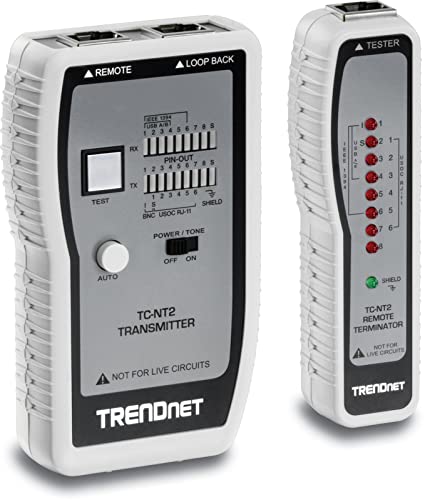
TRENDnet Network Cable Tester TC-NT2 Tests Ethernet USB BNC Cables up to 300m
by TRENDnet
$46.99
- Budget-friendly at around $47 — tests Ethernet, USB, and BNC coaxial cables
- LED indicators for quick pass/fail wiremap and continuity checks
- Tests cable runs up to 300 meters with detachable remote unit
Budget Pick: TRENDnet TC-NT2 — Most Affordable Cable Tester
The TRENDnet TC-NT2, priced around $47, is the most affordable multi-cable-type tester worth buying. It handles basic wiremap and continuity testing for Ethernet, USB, and BNC coaxial cables, making it versatile for mixed environments.
Strengths
- Multi-cable support — tests Ethernet (RJ-45), USB (Type A and B), and BNC coaxial cables
- 300-meter range — sufficient for even the longest horizontal cable runs
- Detachable remote — test installed cables with ends in different locations
- Affordable — around $47, it is a low-risk purchase for students and hobbyists who need to test more than just Ethernet
Limitations
- LED indicators are basic — you see which pins pass or fail, but the display is less intuitive than the Klein for diagnosing specific fault types
- No TDR, no tone generation, no PoE detection
- Build quality is adequate but not in the same class as Klein or Fluke
Who Should Buy It
The TC-NT2 is best for students who want a physical cable tester to supplement their studies without a significant investment, home network builders who need to verify a handful of cable runs, and IT generalists who occasionally need to check a cable but do not do structured cabling work daily.
Professional Pick: Klein VDV501-851 Scout Pro 3 Kit — Full Field Technician Package
For working network technicians and structured cabling installers, the Klein VDV501-851 Scout Pro 3 kit at $349.97 is the professional-grade package that covers every common field testing need.
What the Kit Includes
- Scout Pro 3 cable tester — wiremap, cable length measurement up to 2,000 ft (±5% accuracy), and support for voice, data, and video cables
- Tone generator — the tester generates tone; this kit bundles the separate tracer probe you need to trace it, so you are not buying two devices separately
- Tracer probe — identify and trace cables through walls, ceilings, and bundles
- Crimper and connectors — make and repair cables on-site
- Multiple remote IDs — test and identify up to 19 cable locations from a single patch panel
Why Professionals Choose It
The Scout Pro 3 bridges the gap between a basic tester and an enterprise tool. Cable length measurement tells you how long a run is (handy for verifying TIA/EIA-568 compliance), the bundled tone generator and probe eliminate the need for a separate tracing kit, and the multiple remote IDs save hours when mapping a patch panel to wall jacks. Note what it does not do: it is not a true TDR instrument, so it cannot pinpoint the exact distance to a fault the way the Fluke MicroScanner2 or Klein's own Scout Pro MAX can — and it does not replace a full certifier for formal documentation. Within those limits, it handles everything else a field technician needs.

Fluke Networks MS2-TTK MicroScanner2 Network Cable Tester Kit with Punch Down Tool
by Fluke Networks
$1,126.95
- Enterprise-grade: cable length via TDR, distance-to-fault, and 802.3af PoE detection (does not detect PoE+/802.3at or PoE++/802.3bt)
- Graphical wiremap display with specific fault identification and location
- Fluke Networks industry standard for professional network installers and IT departments — a premium tool, not a step-up buy
Enterprise Pick: Fluke Networks MicroScanner2 — IT Department Standard
The Fluke Networks MicroScanner2 MS2-TTK termination kit, running about $1,127 as of 2026, is the tool you will find in enterprise IT departments and managed service providers. It represents the highest capability level before stepping up to a full cable certifier — and its price has moved well past affordable-upgrade territory, so budget for it as a real capital purchase.
Key Capabilities
- Graphical wiremap display — not just pass/fail LEDs but a screen showing exactly which pins have faults and what type of fault
- TDR cable length and distance-to-fault — measure runs to verify TIA/EIA-568 compliance and pinpoint problem locations
- PoE detection — solicits and detects standard 802.3af PoE only; it does not detect PoE+ (802.3at) or PoE++ (802.3bt/UPoE) — for those, Fluke's separate MicroScanner PoE model is required
- Cable ID — supports Fluke's remote ID locators (numbered #2-7, seven total including the main unit); note the MS2-TTK kit reviewed here does not include the remote ID adapters standard — add the MS2-IDK27 kit separately, or choose the MS2-KIT bundle (about $1,160) if patch-panel cable ID is a priority
- Punch down tool included — the MS2-TTK kit includes an impact punch down tool (IS60 Pro-Tool Kit) for 110-block and keystone jack terminations
When You Need This Level
The MicroScanner2 is justified when you manage an enterprise network where PoE verification is routine (IP phones, wireless access points, security cameras), when you need TDR to troubleshoot cable faults in long or inaccessible runs, and when the graphical display saves time over interpreting LED patterns on basic testers. If the termination-tool bundle is more than you need, Fluke also sells the bare MS2-100 cable verifier for roughly $680.
For students, this is the tool to aspire to once you are employed in a network operations role. For your certification studies, the Klein VDV526-200 teaches you the same fundamental concepts at a fraction of the price.
How Cable Testing Connects to CompTIA Network+ (N10-009)
Cable testing spans multiple Network+ exam objectives. Here is how each concept maps to the exam.
Objective 1.3: Cable Types and Standards
- Know the TIA/EIA-568 standard and T-568A vs T-568B wiring schemes
- Understand cable categories (CAT 5e, CAT 6, CAT 6A) and their maximum speeds and distances
- Know the 100-meter maximum for horizontal Ethernet runs (90m permanent + 10m patch)
- Understand straight-through vs crossover cable construction
Objective 5.1: Network Troubleshooting Methodology
Cable testing fits into the structured troubleshooting process:
- Identify the problem — "User reports no network connectivity"
- Establish a theory — "Physical layer fault: damaged or improperly terminated cable"
- Test the theory — Use a cable tester to perform wiremap and continuity testing
- Establish a plan of action — "Re-terminate the failed cable end"
- Implement the solution — Cut and re-terminate the connector
- Verify functionality — Re-test with the cable tester to confirm pass
- Document findings — Record the fault type and resolution
Objective 5.2: Network Troubleshooting Tools
You must know when to use each tool:
- Cable tester — verify wiremap and continuity, detect opens/shorts/miswires/split pairs
- Tone generator and probe — trace cable paths and identify cables in bundles
- TDR / cable length tester — measure cable length, locate distance to faults
- Cable certifier — formally certify cable performance to category standards
- Crimper — terminate RJ-45 connectors on twisted-pair cables
- Punchdown tool — terminate cables on patch panels and keystone jacks
Study all Network+ troubleshooting objectives for free with our CompTIA Network+ exam prep materials.
How Cable Testing Connects to CCNA
Cisco's CCNA covers structured cabling and Layer 1 troubleshooting as part of the network fundamentals domain.
Physical Layer (OSI Layer 1) Troubleshooting
CCNA expects you to troubleshoot connectivity issues starting at Layer 1. When a switch port shows "down/down" status, the first step is verifying the physical cable — checking for proper termination, correct cable type, and no physical damage. A cable tester is the tool that provides objective evidence at this layer.
Structured Cabling Concepts
CCNA covers the structured cabling hierarchy:
- Entrance facility — where external cabling enters the building
- Main distribution frame (MDF) — primary cross-connect point
- Intermediate distribution frame (IDF) — secondary cross-connect points on each floor
- Horizontal cabling — runs from IDF to wall jacks (90m max per TIA/EIA-568)
- Work area — the patch cable from wall jack to device (10m max)
Cable testers verify each segment of this hierarchy. Understanding where to test and what results mean is part of the CCNA troubleshooting domain.
Cable Types and Standards
CCNA covers straight-through, crossover, and rollover cables; fiber vs copper trade-offs; and the maximum distances for each cable category. Practice these concepts hands-on by making cables and testing them with a cable tester, then reinforce the theory with our free CCNA study materials.
Practical Lab: Build and Test Your Own Cables
The best way to prepare for cable testing questions on Network+ and CCNA is to build and test cables yourself. Here is a simple lab exercise.
What You Need
- Bulk CAT 6 cable (a 25-foot box is plenty for practice)
- RJ-45 connectors (get a bag of 50 — you will make mistakes)
- A crimping tool (included in the Klein Bundle at $74.97)
- A cable tester (the Klein VDV526-200 or TRENDnet TC-NT2)
The Exercise
-
Make a T-568B straight-through cable — Strip the jacket, arrange the conductors in T-568B order, insert into the connector, and crimp. Repeat at the other end with T-568B. Test with your cable tester — all eight LEDs should show pass.
-
Make a T-568A straight-through cable — Same process but arrange conductors in T-568A order at both ends. Test — should pass identically to the T-568B cable.
-
Make a crossover cable — T-568A at one end, T-568B at the other. Your cable tester will show the crossed pairs on pins 1-2 and 3-6 — this is expected and correct for a crossover cable.
-
Intentionally create faults — Make a cable with one conductor not inserted fully (open), two conductors touching (short), or pairs in the wrong positions (miswire). Test each one and observe how the cable tester reports the fault.
This hands-on practice builds the intuition you need for scenario-based exam questions and prepares you for real-world troubleshooting from day one on the job.
Comparison Table: All 5 Cable Testers at a Glance
| Feature | TRENDnet TC-NT2 | Klein VDV526-200 | Klein Bundle | Klein Scout Pro 3 Kit | Fluke MicroScanner2 (MS2-TTK) |
|---|---|---|---|---|---|
| Price | ~$47 | $54.97 | $74.97 | $349.97 | ~$1,127 |
| Wiremap | Yes | Yes | Yes | Yes | Yes (graphical) |
| Continuity | Yes | Yes | Yes | Yes | Yes |
| Cable Length | No | No | No | Yes (±5%, not TDR) | Yes (TDR) |
| Distance to Fault | No | No | No | No | Yes |
| Tone Generator | No | No | No | Yes (tester + bundled probe) | No (separate) |
| PoE Detection | No | No | No | No | Yes (802.3af only) |
| Crimper Included | No | No | Yes | Yes | No (punch down) |
| Cable Types | RJ-45, USB, BNC | RJ-45 | RJ-45 | RJ-45, coax, RJ-11 | RJ-45 |
| Best For | Students on budget | Best value overall | Starter lab kit | Field technicians | Enterprise IT / MSPs |
Which Cable Tester Should You Buy?
Tight budget / student: Start with the TRENDnet TC-NT2 (around $47). It teaches basic wiremap and continuity testing across Ethernet, USB, and BNC at a price you cannot argue with.
Best overall value: The Klein VDV526-200 ($54.97) is our top pick. Reliable wiremap testing from a trusted brand with a remote ID unit for installed cables. This is the tester that delivers the most useful capability per dollar.
Building a home lab: The Klein Cable Tester & Crimper Bundle ($74.97) gives you everything to make, test, and practice — the complete hands-on learning kit for Network+ and CCNA studies.
Working field technician: The Klein Scout Pro 3 Kit ($349.97) adds cable length measurement, tone generation, and tracing — the full toolkit for someone installing and maintaining structured cabling professionally (though not true TDR distance-to-fault).
Enterprise IT department: The Fluke MicroScanner2 (the MS2-TTK kit runs about $1,127) adds true TDR distance-to-fault, 802.3af PoE detection, and the Fluke Networks name that IT managers trust — but at this price point, treat it as a deliberate capital purchase, not a casual upgrade from a $55 tester.
Start with the tool that matches your current needs and budget, then upgrade as your career advances. The cable testing fundamentals you learn with a $47 tester are the same ones you will use with a $15,000+ certifier — the concepts do not change, only the depth of measurement.
Study for your CompTIA Network+ and CCNA exams for free at OpenExamPrep, and pair your study sessions with hands-on cable testing practice to build the skills employers actually hire for.
As an Amazon Associate, OpenExamPrep earns from qualifying purchases. All recommendations are based on editorial review.

 Free CE
 Learning path on Pluralsight
 Take courses on Udemy
 Course Playlist
 Prep options on Achievable